Support at Home
Support at Home software: The program's rules, from the budget to the claim file.
Each participant's classification and quarterly budget, care management set aside, carry-over capped as the program says, supplements and the two pathways — then every invoice asks the participant for their contribution, Make today's claim file puts every line ready to claim in one file for you to upload in the Aged Care Provider Portal, and Services Australia's payment statements are matched back line by line. Monthly statements, the quarter report and the price report come from the same figures.

The rule you work under
The rule you work under
Support at Home funds a participant by quarter from their classification. 10% of each quarterly budget is set aside for care management, unspent funds carry over capped at the greater of $1,000 or 10% of the quarter's budget after care management, and the participant contributes to independence and everyday living services at their assessed rates — clinical supports are free to every participant. Each month the provider gives the participant a statement.
Support at Home — Department of Health, Disability and AgeingHow it flows
From enrolment to the payment statement.
- 1Estimate and enrol
Before someone is enrolled, the estimator works out their year's funding, care management, the services they need and what they would pay each month. Enrol them with their classification and assessed rates.
- 2Budget each quarter
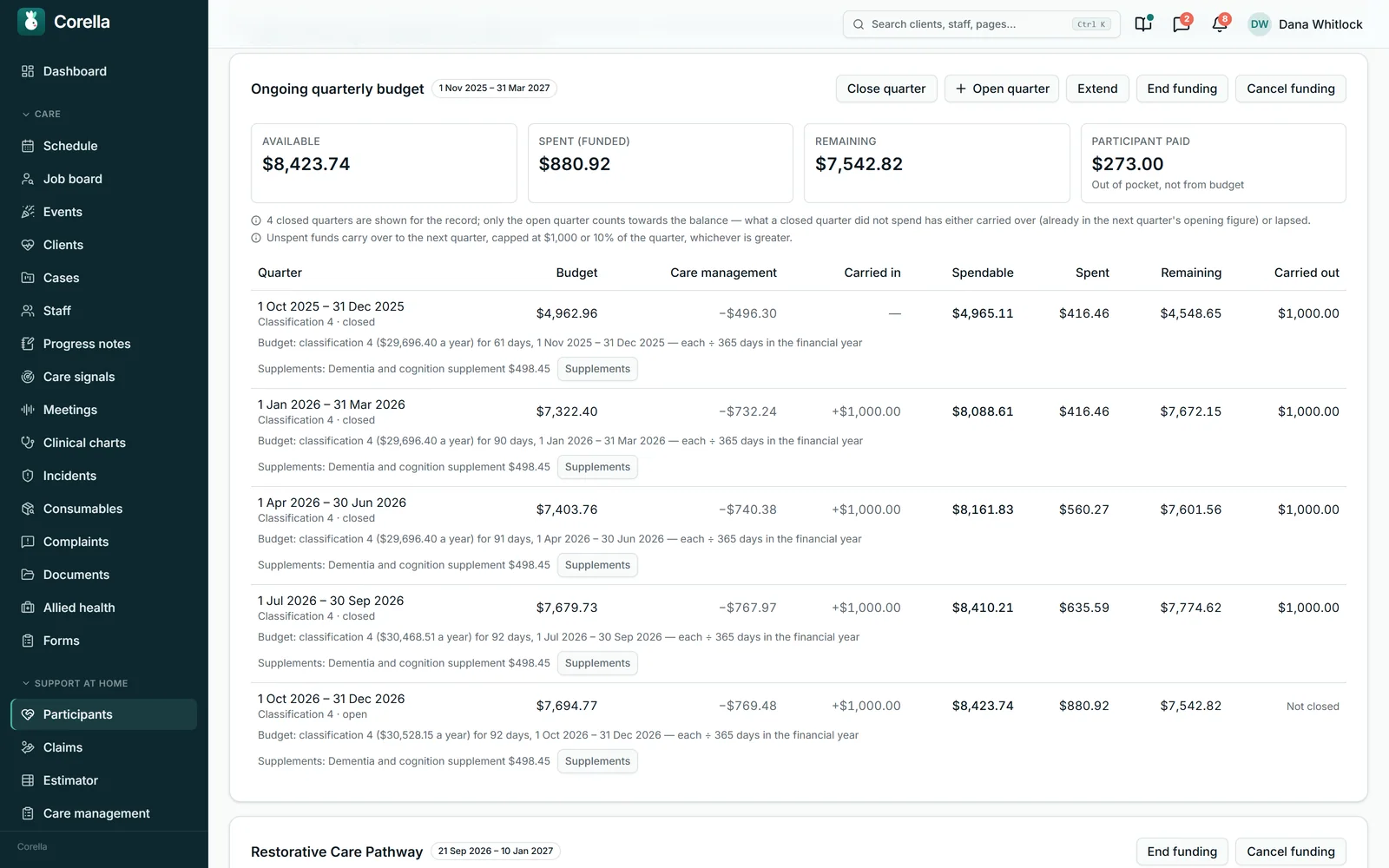
Corella sets 10% aside for care management, as the program does, carries unspent funds over within the cap, adds supplements, and runs the pathways and AT-HM as their own funding.
- 3Invoice the participant's part
Each visit is charged to the participant's budget when its invoice is issued, and the invoice asks the participant for their contribution — the rest is paid by Services Australia when it is claimed.
- 4Make the claim file
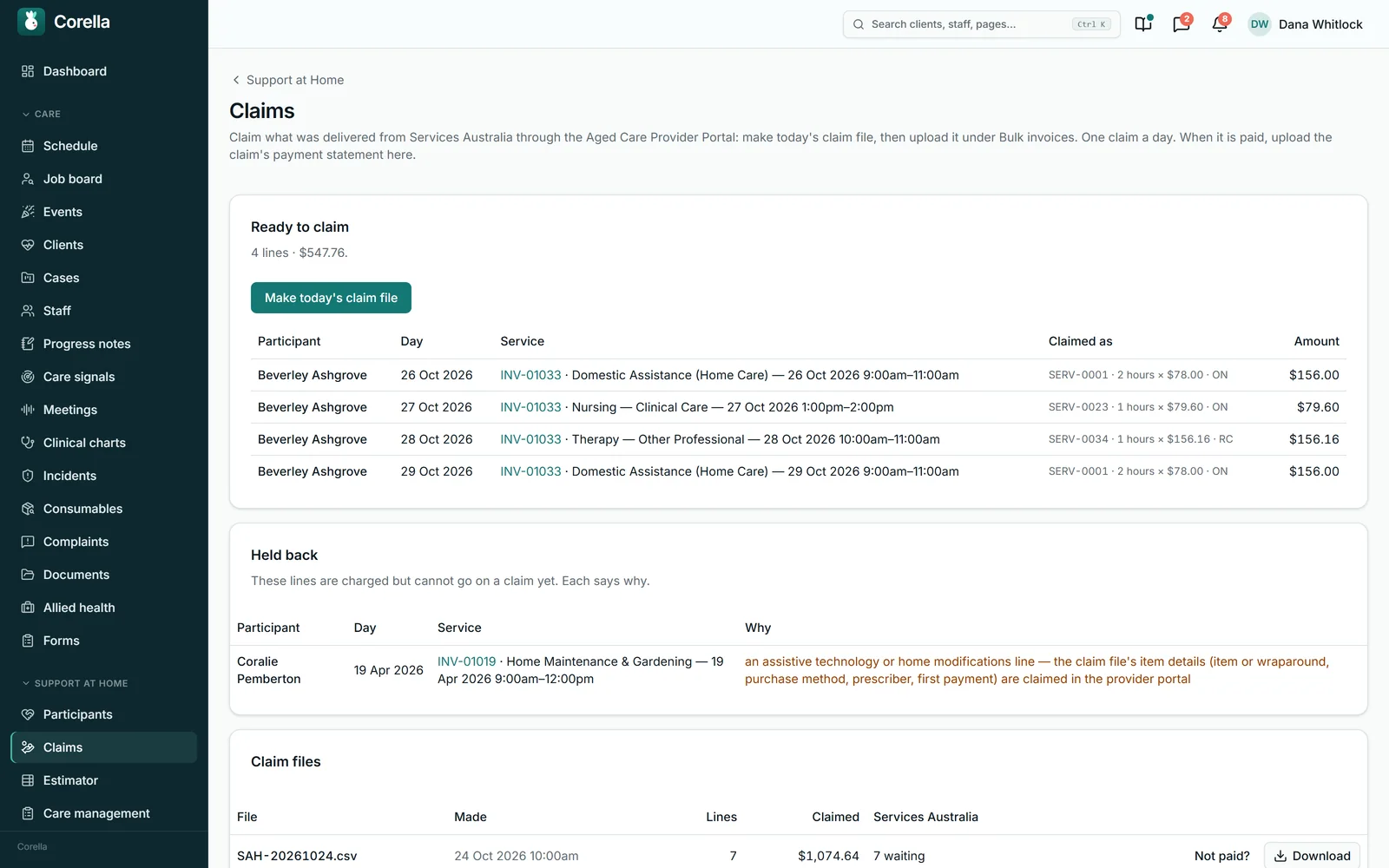
Press Make today's claim file — one a day — and every line ready to claim goes into it. You upload it in the Aged Care Provider Portal under Bulk invoices; assistive technology, home modifications and assistance dog items are claimed in the portal itself.
- 5Match the payment statement
Upload Services Australia's payment statement and each item is matched to the line Corella claimed, with every difference in words.
What people ask first
The short answers, up front.
Who is this for?
Providers delivering Support at Home since it began on 1 November 2025 — ongoing services, the two pathways and assistive technology and home modifications.
How is the budget worked out?
From each participant's classification, by quarter, with 10% set aside for care management and carry-over capped at the greater of $1,000 or 10%.
What does the participant pay?
Their contribution at their assessed rates for independence and everyday living, on every invoice. Clinical supports are free to every participant.
How do claims reach Services Australia?
Make today's claim file builds the file, one a day; you upload it in the Aged Care Provider Portal under Bulk invoices.
What comes back?
The payment statement. Upload it and every item is matched to the line Corella claimed, with each difference shown.
What does the participant receive?
A monthly statement — by email, in the family portal or printed — made from what their invoices charged to their budget.
What about the quarterly reports?
The quarter report, the two-monthly price report and the Quarterly Financial Report's rates of pay come from the same records.
And before someone signs on?
The estimator shows their year's funding, care management, services and monthly contribution before they're enrolled.
And when someone leaves?
Their funding ends on the day, and each thing the outgoing provider owes is listed with its deadline.
Whose screen
The same job, from each seat.
In the office
Your finance team issues invoices, makes the claim file, uploads it in the Aged Care Provider Portal and uploads the payment statement back; your care partners see each participant's budget, plan the quarter before rostering and work through the reviews the program calls for.On the phone
Care workers deliver the visits on the roster as they would for anyone else; each visit carries its service and price from your Support at Home service list, so the invoice, the budget and the claim follow from what was worked.For families
The participant, or their family, sees each invoice and their balance in the family portal and receives their monthly statement there, by email or on paper.A worked example
One participant, one month.
A classification 4 part-pensioner from the aged-care demo, in October 2026 — the figures on her monthly statement.
- Her budget for the quarter
- $7,694.77
- Set aside for care management (10%)
- −$769.48
- Rollover credits from last quarter
- +$1,000.00 (the cap)
- A supplement this quarter
- Dementia and cognition supplement, $498.45
- Used by services in October
- −$880.92
- Remaining at the end of October
- $7,542.82
- Her Restorative Care Pathway episode
- $6,000.00, with $5,531.52 left at the end of October
Demo figures, from the aged-care demo's statement. Her contribution rates are 0% for clinical supports, 20% for independence and 35% for everyday living, so each invoice shows what she pays and what Services Australia pays.
Try it
See it work.
One quarter of the ongoing budget
Classification 4 · part pension (demo data)
Ongoing
Quarterly, and unspent funds carry over (capped).
AT-HM
Two budgets — assistive technology and home modifications — each with its own scheme and tier, held apart from the quarters.
Restorative Care Pathway
A time-boxed episode on top, with its amount and dates — a visit chosen for it is charged to it.
End-of-Life Pathway
Replaces the ongoing classification for its weeks, rather than sitting on top. Recorded as a grant with its amount and dates.
Corella holds the Support at Home budget model — the dated classification figures, the quarters, the care-management line and the carry-over — and issuing a Support at Home invoice charges the visits on it to the participant’s ongoing quarterly budget and asks the participant for their part.
In detail
The detail, on the real screens.
Budgets the program's way
Each participant's classification gives their quarterly budget. Corella sets 10% of it aside for care management before anything is spendable, as the program does, adds the quarter's primary supplements — oxygen or veterans', as Services Australia shows them — to what the participant can spend, and carries unspent funds into the next quarter capped at the greater of $1,000 or 10% of the quarter's budget after care management, supplements included. Interim funding is worked out at 60% of the classification until the rest is allocated, then in full from that date. The Restorative Care Pathway, the End-of-Life Pathway, assistive technology and home modifications — two schemes, each with its own tiers — and assistance dog funding each run as their own stream. The program's published figures, from 1 November 2025, 1 July 2026 and 1 October 2026, load with one press, each from its own day, and figures of your own are kept.

The participant pays their part
Each participant's contribution rates come from their assessment — clinical supports free, independence and everyday living at the rates on Services Australia's letter. An invoice shows the total cost of the services, care management on its own line, the share Support at Home funds and what the participant pays, and it asks the participant for their contribution: the rest is paid by Services Australia when it is claimed. Payments, reminders, the family portal's balance and Xero all follow that figure. When Services Australia's payment statement confirms a different contribution, that confirmed figure is the one charged, with Corella's own figure beside it. A change of assessed rate applies the way the program says — a higher rate from the next quarter, a lower one back-dated, with any refund due shown on an invoice already paid.

Claims: a file for the Aged Care Provider Portal
Claims lists every line charged to a Support at Home budget that isn't on a claim yet, as it will be claimed: Services Australia's service code, the quantity and unit, the price and the budget it draws on. Make today's claim file puts them in one file — Services Australia's bulk invoice file — named for the day; you download it and upload it in the Aged Care Provider Portal under Bulk invoices, one claim a day. Each line that can't be claimed yet is held back with its reason, most often a care recipient ID still to record or a service still to match to the Support at Home service list. Assistive technology, home modifications and assistance dog items are claimed in the portal itself, with their item details, and a line more than 60 days after its budget ended goes on a claim with its late reason.

Every claim file, and what's still owed
Each claim file stays listed with its lines, what was claimed and what Services Australia has paid — paid, waiting or not paid — and can be downloaded again. Waiting on Services Australia is what it still owes: every claimed line with no payment statement yet, the amount expected after each contribution, and how long since its file was made. If a claim was cancelled or lines taken out of it, Not paid? puts its waiting lines back to be claimed again.

Payment statements, matched line by line
When a claim is paid, download its payment statement as CSV in the provider portal and upload it to Corella. Each item is matched to the line Corella claimed, and the statement opens with what was paid and when, the bank reference the deposit carries, and each line's claim, contribution and payment. Lines that differ from Corella's own figures come first, each difference said in words — a hardship reduction, a changed price, an adjustment — and a line Services Australia adjusts later is compared across every statement that answered it. Pressing Found it in the bank records that the deposit arrived.

Before and after enrolment
The estimator works out, before someone is enrolled, their year's funding, care management, the services and items they need and what they would pay each month — to print, or save against them. At intake the office records the My Aged Care referral — its code, the Notice of Decision and the approved services — and completing the intake enrols them. Their service agreement carries the program's own section: their Notice of Decision, each approved service with its prices by time of day, what they contribute, and the program's terms. Time-of-day loadings and a price agreed with a participant go on their invoices, and a price change applies from its own day.

Every month and every quarter
Each participant's monthly statement shows the quarter's budget, the 10% set aside, rollover credits, supplements, what was available and what remains, and every service delivered by its name on the Support at Home service list, with the participant's contribution and the subsidy claimed. Give it by email, in the family portal or printed — or print every participant's at once. The quarter report shows each participant's quarter and the hours delivered by service type; the price report gives each service's most frequently charged price for each two-month period. For the Quarterly Financial Report, Corella works out the Support at Home rates of pay from your staff records, for you to lodge in GPMS.

Care: the plan, reviews, the pathways and leaving
The care plan carries the program's contents, and is reviewed at least every 12 months. Corella calls for a review itself when a classification rises, assistive technology or home modifications funding is added, the End-of-Life Pathway starts or the approved services change; the office calls for one on the program's other triggers, such as a change in needs; and every review called for is listed by care partner until the office records it. A Restorative Care Pathway episode has its goal plan and its exit plan, and the End-of-Life Pathway its form. When someone leaves, their funding ends on the day and each thing the outgoing provider owes is listed with its deadline.

Straight answers
Safety built in: what warns you, and what it stops.
Warns you
- A line that can't go on a claim yet — it's held back with its reason, such as a care recipient ID still to record.
- A line claimed more than 60 days after its budget ended — it asks for the late reason Services Australia lists.
- A payment statement that differs from Corella's figures — each difference in words, listed first.
- A claim still unpaid — Waiting on Services Australia counts it by how long since its file was made.
- A care plan review the program calls for — listed by care partner.
- An invoice line not charged to a budget yet — named on the statement before it is given.
Stops you
- A charge to a closed quarter — closing records the carry-over and the quarter takes no more charges.
- Late lines going on a claim without the late reason Services Australia lists.
- A clinical support contribution — clinical supports stay free to every participant.
The rulebook
Questions, answered properly.
Does Corella send our claims to Services Australia?
How does Corella work out a participant's budget?
How is the participant's contribution charged?
What happens when Services Australia's figures differ from ours?
Which funding streams does Corella handle?
What do we give the participant each month?
What about the Quarterly Financial Report?
Can we estimate before someone signs on?
What happens when a participant leaves?
Guides for this
Read the rule behind it.

See Support at Home software on a live instance.
Try the aged care demo with a time-boxed pass, or book a walkthrough and we'll show you this part of Corella in your own words.