Shift matching
Shift matching for care rosters: Who should work this shift? Answered — with the working shown.
Every coordinator runs this sum in their head: who's free, who's current, who the participant knows, who tips into overtime. Corella runs it across everyone at once and shows the reasons, not just a number — rules and arithmetic you can check by hand. A ranking you can argue with is a ranking you can trust.


How it flows
From a gap on the board to a filled shift
- 1A shift needs someone
An unassigned shift on the board, a gap on the job board, or a new shift you're still filling in — the ranking works on any of them, saved or not.
- 2Blocks set aside
Anyone already rostered at that time, on approved leave, or marked incompatible with the participant is listed apart, with the reason.
- 3Everyone else, scored
Seven factors add up to a hundred points, and every candidate carries their reasons for and against in plain words.
- 4You pick
One click rosters your pick after the booking checks run again — a refusal refuses, and anything else shows once, with a tick to go ahead. Then the worker is told.
- 5Or a worker takes it
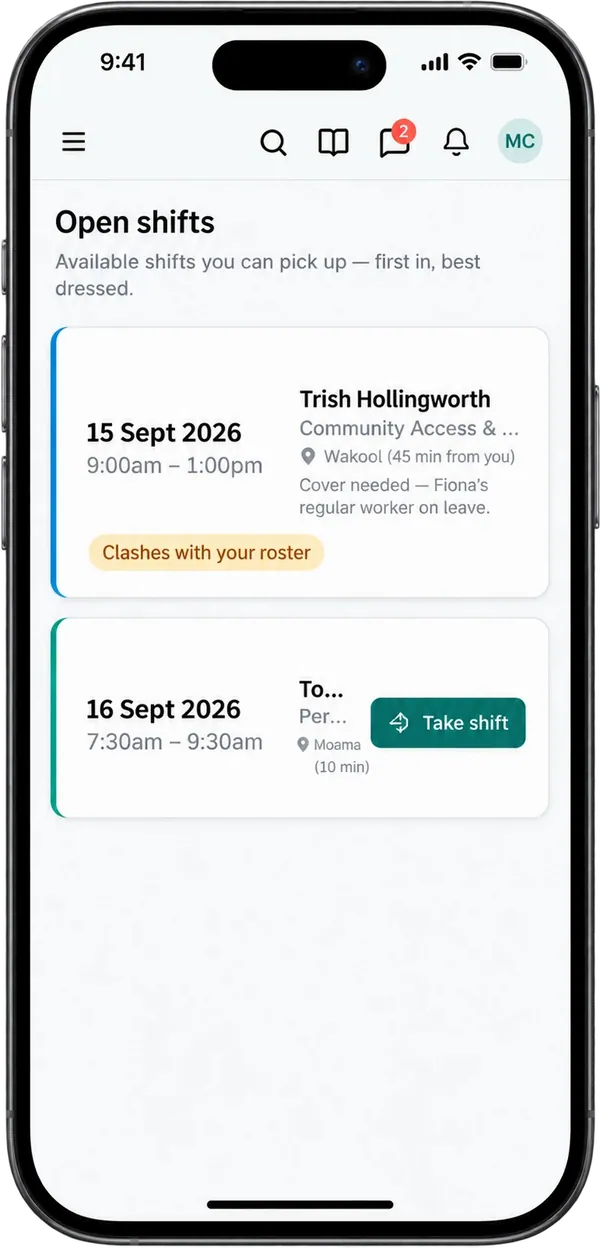
Post the shift instead and it appears on workers' phones, where the first to take it has it.

What people ask first
The short answers, up front.
What does it rank on?
Availability, mandatory checks and training, skills and language, continuity with the participant, closeness, hours left under the weekly cap, and the award.
Who is set apart from the ranking?
Anyone already rostered at that time, on approved leave, or marked incompatible with the participant — listed apart, with the reason.
Why is someone ranked where they are?
Every candidate carries reasons for and against in plain words — free and inside their hours, a check expired, three shifts with this participant.
Does the regular worker count for more?
Yes. Continuity is worth 14 of the 100 points: named as preferred scores highest, then recent shifts with the participant, and a shared team adds to it.
Will it rank someone into overtime?
Each candidate is award-checked as if they'd taken the shift; a breach or an overtime review costs points and is named beside them.
How does it work it out?
As a weighted score over facts already in your system, so you can check the working by hand.
What can we tune?
The inputs: each service's skills, and each worker's availability, cap, teams and qualifications. The weights are the product's own, so a score means the same thing everywhere.
How is closeness scored?
By suburb and postcode: the same suburb first, then the same postcode, then the same postcode district.
Where do I use it?
In the shift drawer — 'Who should work this shift?' — and on the job board, which ranks the best-matched people for every shift still short of staff.
How do workers get shifts?
They take posted shifts from their phone, first in, and the ranking is the office's tool. Where an administrator switches it on, a worker can also ask the office for a shift, and the office books it through the New shift form.
Whose screen
The same job, from each seat.

In the office
The coordinator asks 'Who should work this shift?' from the shift drawer — for a shift already on the board, or one still being filled in — and gets up to fifteen people ranked, each with their reasons, and anyone blocked shown apart with why. Or they work from the job board: every shift still short of staff, soonest first and a dozen to a page, with up to ten best-matched people ranked under each and the unfilled hours counted at the top. One click rosters the person they pick, and the booking checks run again first.On the phone
The ranking and its reasons stay with the office. What workers see is Open shifts: each posted shift marked 'You're on it', 'Not available to you', 'Clashes with your roster', or carrying a Take shift button. Taking one assigns them straight away, first in, and tells the coordinators.For families
A participant's portal shows who's coming once a shift is filled — the worker's name, or 'to be confirmed' until then. The ranking, and every reason in it, stays with the office.A worked example
One candidate, scored the way the product scores.
Demo figures: a made-up support worker for a made-up four-hour weekday shift. The weights are the product's own, and fixed; everything about the person is invented.
- Availability — free, and inside the hours they said they can work
- 22 of 22
- Checks and training — one of five mandatory items has expired
- 16 of 20
- Skills — holds one of the two qualifications the service needs
- 8 of 16
- Continuity — three shifts with this participant in the last 90 days
- 11.2 of 14
- Location — same postcode as the participant, different suburb
- 10.8 of 12
- Hours — 24 of a 38-hour cap once this shift is added
- 3.7 of 10
- Award — no problem created by taking the shift
- 6 of 6
- Score, rounded
- 78 · Good match
- A colleague already rostered at that time
- Shown apart, with the reason
The weights add up to a hundred: availability 22, checks and training 20, skills and language 16, continuity 14, location 12, hours 10, award 6. The verdict follows the score — 80 and over reads 'Strong match', 65 and over 'Good match', 45 and over 'Possible', below that 'Poor fit'. The expired check cost four points, it's named in their reasons, and booking them would warn.
In detail
The detail, on the real screens.
Seven factors, a hundred points
Each candidate is scored out of a hundred on seven weighted factors: availability 22 — free, and how much of the shift falls inside the hours they said they can work; mandatory checks and training 20; skills and language 16 — the qualifications the service asks for, and the participant's language; continuity with the participant 14; closeness 12, by suburb and postcode; hours left under their weekly cap 10; and the award 6 — whether taking the shift would create an award problem. Facts already in your system, weighed the way a careful coordinator weighs them, for everyone at once. Beside the number sits a plain verdict — Strong match, Good match, Possible or Poor fit.

It shows its working
Every candidate carries their reasons for and against, in plain words, grouped by factor. 'Free, and inside the hours they said they can work.' A mandatory check that has expired, named. Holds one required skill, missing the other. Three shifts with this participant in the last 90 days. Lives in the same suburb. Would go past their weekly cap, with the figure. And for the award, either no problem from this shift, or the breach by name. The ranking is arguable rather than a black box, and that's the point — the engine's job is to make sure nothing obvious was missed, and the decision is yours. When you disagree, the reasons tell you what it weighed, and you pick someone else.

Blocked is blocked — set apart, with the reason
A real clash, approved leave, or a worker the participant has marked as incompatible is a block, kept out of the score entirely. Those people are taken out before anyone is scored: in the shift drawer they're listed apart, each with the reason — already rostered at that time, on approved leave, marked incompatible — and on the job board they're left off, so the numbers a busy coordinator reads belong to the people who could take the shift. Leave that has been requested and is still waiting on a decision is scored instead — low on availability, with the reason written beside them.

Continuity of care, scored
A participant's regular worker usually outranks a stranger with the same certificate, and the score reflects it. Someone the participant has named as preferred gets full marks for continuity. Otherwise it's recent history: shifts worked with this participant in the last 90 days, scored higher at two and higher again at five. Being in the same team as the participant adds to it. Someone who has never worked with them is marked as new to this participant and scores lower on continuity — lower, not zero, because every regular worker was new once. Continuity is worth 14 of the hundred points: enough to lift the familiar face, not enough to bury a better-qualified one.

Award-aware, in plain sight
Filling a gap fast is how an overtime bill gets made. So each candidate is checked by the same nine SCHADS rules as the board, as if they'd already taken the shift: too short a break before it, a minimum engagement it falls under, the day or the week it tips past. A breach costs the award factor's full six points; an amber review, such as overtime, costs three; and either is named in the candidate's reasons. Six points of a hundred is deliberate. A strong candidate can still rank near the top with an award problem — but the problem is written beside their name, where you'll see it before you click, and picking them warns again.

Availability, hours and closeness — read from what's recorded
Availability reads the weekly windows each worker has said they can work: a shift wholly inside them scores highest, a shift partly inside is scored by how much, and someone with no availability on file is treated as free but unconfirmed. A standing weekly unavailability, or leave requested and not yet decided, scores low and says so. Hours read the weekly cap on their record: the more room left after this shift, the higher; past the cap scores zero, with the figure; no cap set is neutral. Closeness compares suburb and postcode — the same suburb first, then the same postcode, then the same postcode district.

Skills, language, checks and training — off the records you keep
Each service lists the qualifications it needs, and each worker's record lists what they hold. A current competency sign-off counts as holding the skill; one marked 'under supervision' doesn't, because somebody who may only work supervised shouldn't be sent alone. Names are matched loosely, one containing the other, so 'Manual handling' finds 'Manual handling (refresher)'. Where the participant's language is recorded, a worker who speaks it scores higher — and where an interpreter is needed and the worker doesn't speak it, lower. Mandatory checks — the documents your organisation requires — and mandatory training are read as current, expired, missing or outstanding, and each is named in the reasons.

In the drawer, on the job board — and on the worker's phone
Two office screens use the same engine. In the shift drawer, 'Who should work this shift?' ranks up to fifteen people for the shift in front of you — even one you haven't saved yet — with anyone blocked shown apart, and a click puts your pick on the shift for you to save. The job board lists every shift still short of staff, soonest first and a dozen to a page, with up to ten best-matched people ranked under each, the unfilled hours counted at the top, and one click to roster someone — the booking checks run again first, then the worker is told. Post a shift instead and it goes to workers' phones, where the first to take it has it.

Straight answers
Safety built in: what warns you, and what it stops.
Warns you
- An expired or missing mandatory check, or training not completed — named in the reasons, and it costs points.
- An award breach or an overtime review the shift would create — named with the finding, and it costs points.
- Leave requested but not yet decided, or a standing weekly unavailability — a low availability score, said in words.
- A shift that would take someone past their weekly hours cap — zero on hours, with the figure.
- Picking someone: the booking checks run again, and any warning shows once with a tick to go ahead.
Stops you
- Scoring anyone already rostered at that time, on approved leave, or marked incompatible with the participant — they're set apart in the drawer and left off the job board.
- Booking a worker the participant has blocked — refused from the ranked list, as it is anywhere else on the roster — and, for a participant only their team works with, anyone outside their teams.
- Filling a cancelled shift from the ranked list; and a shift leaves the job board once it's fully staffed.
Who stays responsible
The coordinator picks. The ranking weighs the obvious things and shows why, and the coordinator adds what only they know — which is exactly why it's built to be overruled, and why a person puts the name on the shift.
The rulebook
Questions, answered properly.
In the help centre

How does shift matching work out its ranking?
What if we disagree with the ranking?
How are the factors weighted?
Why is someone on approved leave missing from the list?
How is a participant's preferred gender shown?
How do expired checks show in the ranking?
Can workers ask for shifts?
Where do the required skills come from?
How does it judge who's close?
How does it handle overtime?
What happens when I click a name?

See shift matching for care rosters on a live instance.
Try the NDIS demo with a time-boxed pass, or book a walkthrough and we'll show you this part of Corella in your own words.