Clinical & episodes of care
Clinical care software: Clinical work, recorded properly — with your clinicians making every call.
Community nursing and wound care run on episodes, not open-ended rosters: a referral arrives, a funded piece of work opens, visits happen, dressings get used, and somebody has to bill the right payer at the price that applied on the day. Corella models that shape directly, and keeps the record while your clinicians do the interpreting.


How it flows
Referral in, episode open, the right payer billed.
- 1Referral
A person triages the referral and accepts it. The office opens an episode of care for the patient, naming the payer, the approval and the referrer.
- 2Episode
The episode carries the visits booked against it, the consumables recorded against it and its invoices for that funded piece of work, with its funding in dollars, visits or hours. A note written on one of its visits joins it, and wounds, documents and letters can be filed on it.
- 3Visit
The nurse clocks on, fills the practice's visit form and writes the note, which joins the visit's episode. Every measurement is typed by the nurse.
- 4Record
Corella works out area, volume and the change against that wound's first measurement. The note locks when it's final; a correction is an addendum.
- 5Bill
Visits and dressings price from the payer's card in force on each service date, bill once, and group into invoices by patient, funding and episode.

What people ask first
The short answers, up front.
What is an episode of care?
A named, dated piece of funded work for one patient. It carries the visits booked on it, the consumables recorded against it and its invoices, and names who pays. A note written on one of its visits joins it, and wounds, documents and letters can be filed on it.
Who can be a payer?
An insurer, a plan manager, a residential aged-care facility or home-care provider, a hospital, a GP practice, community health, a government funder such as DVA, TAC, WorkCover or state health, an employer, or the patient.
Which price does a visit get?
The one on the payer's rate card in force on the service date, whenever the invoice is raised.
What does the wound chart show?
Arithmetic on the numbers your nurse typed, labelled on every trend, chart and comparison: “A record of what was measured. Not a clinical assessment.” Your clinician reads it and decides.
Where does the next review date show?
On the wound record: the next review date your clinician sets on the wound's treatment plan.
What happens once a note locks?
It stays exactly as written, for its author and administrators alike. A correction is an addendum with its own reason, and the original stays visible.
How are dressings billed?
At the payer's price, exactly once. An invoice run takes only unbilled use, and voiding the invoice releases it for the next run.
Can we say patient instead of client?
Yes. Choose patient, nurse and episode of care, and the interface follows your words.
Can DVA be a payer?
Yes. DVA can be a payer with its own rate card, and Corella raises the invoice to it.
How is AI switched on?
Feature by feature: each AI feature has its own switch, separate from any preset. Where one is on, text is processed by our AI provider in the United States under terms that prohibit training on customer content, and speech is transcribed in the European Union, with your instance instructing that service, once the text comes back, to delete the recording and its copy of the text.
Whose screen
The same job, from each seat.

In the office
The front desk books each visit against the right episode, and the booking drawer warns before saving if the visit would take the episode's funding or the payer's contract near or over its limit — in dollars, visits or hours — and names the episode's state if it's on hold, closed or expired. The clinical lead keeps the wound record: the measurements, the trend, the date-range comparison, the CSV export and the photographs, which stay on office screens. Finance keeps the payers, their dated rate cards and contracts, and runs the invoices.On the phone
The nurse's phone shows today's visits as a timeline with the free time between them labelled, and the need-to-know brief at clock-on when anything is recorded. At the visit they fill the practice's visit form — the wound-care template works out area from length × width, and with copy-forward switched on it starts from the last visit's answers, each marked “Unchanged from the previous visit” — write the note, which joins the visit's episode, and record the observation charts your office keeps for that patient. It's a web app installed from the browser.A worked example
One episode, two rate cards, one invoice
An insurer-funded leg ulcer episode, with a nursing visit either side of the insurer's new schedule on 1 July and a dressing used at each. Demo figures — not a real payer's prices.
- Visit on Tuesday 30 June 2026 — 2025–26 card
- $118.00
- Visit on Thursday 2 July 2026 — 2026–27 card
- $124.00
- Foam dressing × 2, at the insurer's price
- 2 × $6.40 = $12.80
- Invoice raised on 10 July, before any GST
- $254.80
- If that invoice is voided
- Both visits and both dressings go back to unbilled
- When it's invoiced again
- The same prices — each visit keeps its own date's card
Demo figures. The price follows the service date, not the invoice date, and a card's last day counts in full — a 3 pm visit on 30 June still takes the old card. Voiding releases the lines for the next run.
Try it
See it work.
Right lower leg — area over seven visits
Length × width typed by the nurse at each visit · demo data
Area reduction
51.4%
1872 mm² on 3 Aug → 910 mm² on 14 Sep, from the numbers typed.
A record of what was measured. Not a clinical assessment.
The label the product itself puts on every trend, chart and comparison. The conclusion is your clinician’s.
In detail
The detail, on the real screens.
An episode of care, with the payer attached
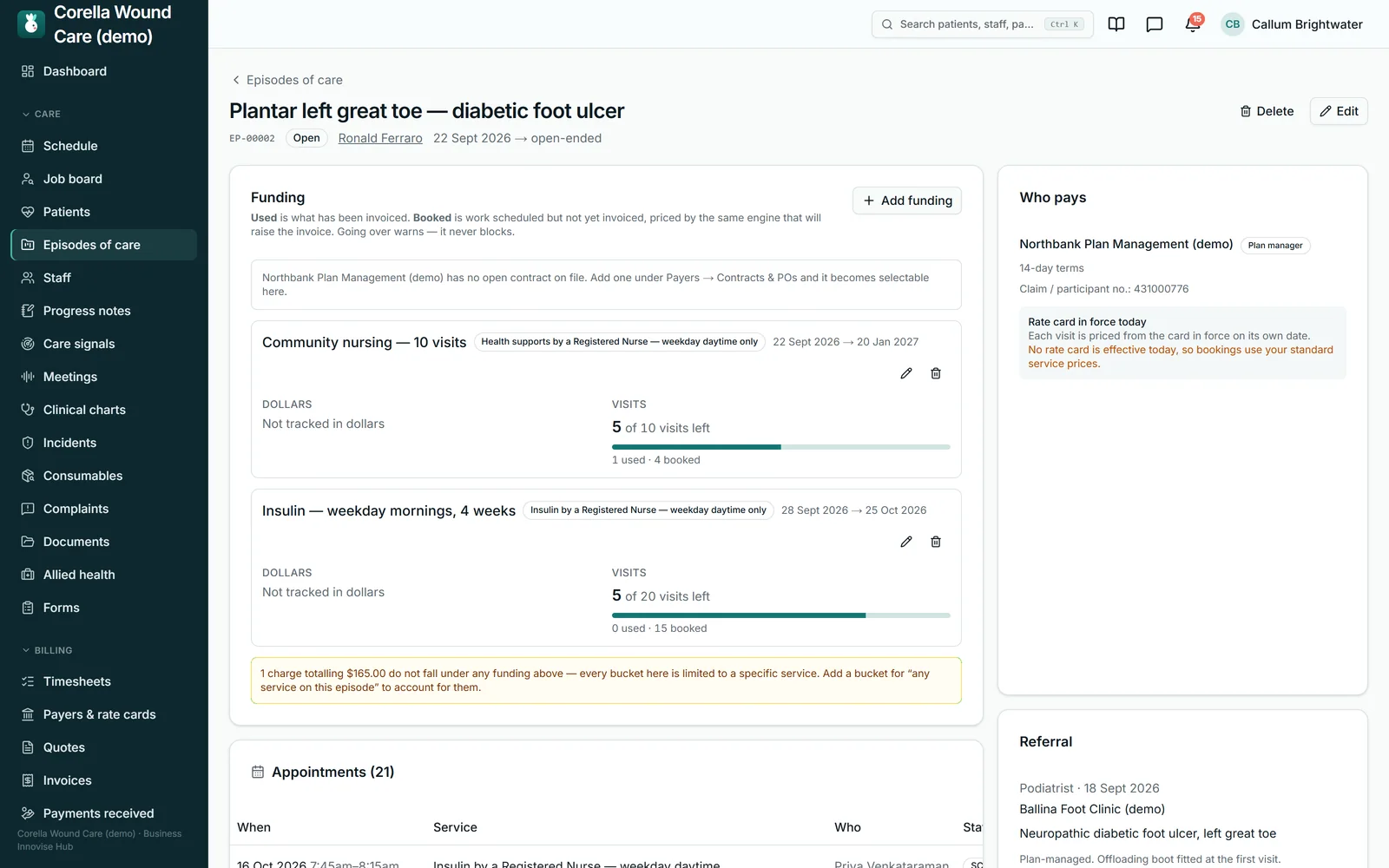
An episode — a case, if that's your word — spans a date range and carries one funded piece of work for one patient: the appointments booked against it, the consumables recorded against it and its invoices. A note written on one of its visits joins it, and wounds, documents and letters can be filed on it. It names its payer, and optionally the payer's site, such as a ward or a facility; the payer's reference, the claim or participant number and the approval number; the referral source and the referrer's diagnosis as written. Funding sits on the episode in dollars, in visits or hours, or both, and the screen separates what has been used, meaning invoiced, from what is booked but not yet invoiced — both count against the limit. Expired is not Closed: expired means the funder's approval ran out and the work may resume on renewal; closed means it finished. The claim and approval numbers print on every invoice for the episode, and changing the approval number changes future invoices only — issued ones keep the number the funder will match on.

Every payer, at the price that applied on the day
Each payer — an insurer, a plan manager, a residential aged-care facility or home-care provider, a hospital, a GP practice, community health, a government funder such as DVA, TAC, WorkCover or state health, an employer, or the patient — carries its own sites, contacts, payment terms and billing email, and its own dated rate cards. The card in force on the service date sets the price, so the same visit dated either side of 1 July prices differently without anyone remembering to change something. A card's last day counts in full, each payer has one card in force on any date, and a card can be copied forward into a new period. Consumables can carry a per-payer price. Contracts and purchase orders sit beside the cards — a value, authorised visits or hours, an end date and your own warn-at percentage — and work booked but not yet invoiced counts against them. Per-payer cancellation rules set a notice window and whether a late cancellation is chargeable; the cancel dialog pre-selects the mode for a person to confirm.

Wound measurements, charted — and read by your clinician
Your nurse measures the wound and types the numbers. Corella works out the area (length × width) and the volume (area × depth), the percentage change against that wound's own first measurement and against the previous one, draws the trend, narrows the comparison table to any date range and exports a CSV. Photographs sit in a timeline — several per visit — with the first and latest side by side. The clinician records the assessment in a structured way: the wound bed by percentage, undermining and tunnelling by clock position, exudate, periwound skin and edges, and an explicit “Did you assess for infection?”, where a blank reads Not recorded — kept apart from a no. An administrator edits the wound-bed descriptor scale in Settings, and each assessment keeps the wording it was made with. The figures are worked out afresh each time they're shown, so correcting a measurement corrects the history. In Australia, software that interprets a wound is a registrable medical device, so Corella keeps the record and your clinician makes every call about the wound — how it's progressing, when to review it, what the tissue is. Every wound trend, chart and comparison carries the product's label: “A record of what was measured. Not a clinical assessment.”

Visit forms, note templates and the clinical record
Forms → Starter templates installs nine clinical note templates — wound care, continence, catheter, gastrostomy, medication and injection, diabetes education, palliative, post-operative, and chronic care and wellbeing — each an ordinary form your team can edit. Field types include tick-many, where every option prints on the PDF ticked or not, a number with its unit, and a calculated field worked out on the server when the form is submitted. Switch on copy-forward for a template and the form starts from the same patient's previous visit, marking every answer still identical “Unchanged from the previous visit” — on screen, in the saved record and on the PDF — and leaving those answers off trend charts; signatures, photographs and calculated fields start fresh each visit. A section can be ruled not applicable for this visit, and the PDF says so. The patient's clinical record holds the charts, the wound body map and the medication record, and an administrator can chart a chosen form answer over time there, captioned “A record of what was recorded. Not a clinical assessment.”

Notes that lock, and corrections that show their working
A clinical note becomes final when your organisation's auto-lock window passes — 12, 24, 48 or 72 hours, or seven days — or when its author marks it final on the office notes screen. After that the lock has no override: not for the author, not for an administrator. A correction is an addendum — its own record, with a required reason, the author and the time — shown beneath the original, which stands. For supervised clinicians, the author can ask — from the office notes screen — one named senior colleague to countersign, or to send the note back with a reason, so review is recorded by name rather than assumed. Notes can carry required headings you set for each kind of note, a note written on a visit joins that visit's episode of care, and a note written up after the visit can be attached to the visit it belongs to. That's what makes a clinical note evidence: it stays exactly as written, and every correction shows.

Consumables that get billed exactly once
Dressings, PPE and continence aids live in a catalogue with pack sizes, suppliers, batch or lot numbers and expiry dates, plus named kits that go out together. Each item has a price, and a payer can have its own. Use is recorded against the patient — and, where it applies, the episode — from the office or clinical-lead screens. In Chrome or Edge, on Android or a computer, a packet's code or a batch's lot number can be scanned with the device camera. The part that matters at month end: an item is billed exactly once — an invoice run takes only unbilled use — and voiding the invoice releases it for the next run, so a dressing on a voided invoice goes into the next one. Stock a facility or the patient supplies is recorded and left off the bill, and an item marked not for sale is counted and left off the bill too.

Stock on hand, in each place you keep it
Corella keeps a count of each consumable in each place you stock it — the store, a vehicle, one nurse's own bag — and the default place is preselected on a visit note. Receive, correct or write off stock by hand, and set a reorder point to get a low-stock alert overnight; the list marks each holding Low or In stock and heads with how many need attention. Stock comes out only when a use is recorded against a person, so every decrement says what it was used on.

Send a document from the record, and know whether it went
Nothing your organisation sends goes out until three separate switches agree, and one of them is ours: the email service configured on your instance, our approval of the instance, and your own switch — Corella's own sign-in emails aside. With email on, a coordinator can send a stored document from a patient's record — a report, a plan, an invoice PDF — with a covering message and up to ten more documents from the same patient's record, 20 MB in all. Each attachment is checked on the server; a document from another person's record, an archived one or one with no file is refused by name. Every send is logged — who sent it, when, to whom and what went — and a send that fails at the email step is logged as failed, which is the half that protects you: an unsent referral that nobody knows is unsent is worse than one that never left. A practice-wide Sent emails list, filterable by patient, sender and result, opens each email as it went. Mail goes from Corella's address under your organisation's name, with your email as the reply-to, and the Sent emails list is the record of every send.

A recorded visit drafts the note — and the nurse finishes it
The visit scribe, off until your organisation switches it on, puts a Record the visit button above the nurse's note. The nurse tells the patient the visit is being recorded, records it on their phone, and a few minutes later the note arrives drafted into your organisation's own note headings, to read back, fix and save. Nothing is saved until they press Save, and they can discard the draft. The patient signs permission to be recorded first — the card offers it on the same device, there and then — and the scribe works on visits with one patient.

A letter drafted from the record — gaps marked, signed by a person
A coordinator picks the kind of letter — to the GP or referrer, a referral to another clinician or service, a summary for the person or their family, or a letter of justification for equipment, consumables or ongoing care — and who it's addressed to, and can say what to include or leave out. The draft is written from this patient's record only: the profile, and the progress notes, forms, incidents, medication log and wound assessments of the last twelve months, and it cites what it used. Where the record is silent, the draft leaves a marked gap, and Finalise waits until every gap is filled. Whoever finalises the letter signs it under their own name and registration; it becomes a PDF in the patient's documents, ready to file on their episode of care, and a person sends it like any other document, through the send log above.

Patients, nurses, episodes — and a preset to start from
Settings → Roster display sets the words: patient for the people you support, nurse for the people who do the work, episode of care for a case — each picked from a list or typed as your own, with all four forms of each word stored rather than derived, so “the patient's plan” and “Patients” both read correctly. Navigation, headings, filters, reports and report exports follow, the incident register's included. Web addresses stay as they are — /clients stays /clients — and it's a display setting, so your records stay exactly as they are: the interface follows your words, and printed documents use their own wording — a service agreement says the program's word (participant under the NDIS and Support at Home, client under CHSP), and yours for a private arrangement. Settings → Modules offers business-type presets, including one for community nursing and health clinics: expanding one previews what it turns on and off, Use this fills the switches, and nothing saves until you press Save. A starter library of thirty-three services installs unpriced on purpose, so every rate is yours to set. Each AI feature has its own switch, separate from any preset; where one is on, text is processed by our AI provider in the United States under terms that prohibit training on customer content, and speech is transcribed in the European Union, with your instance instructing deletion of the recording and its copy of the text.

Straight answers
Safety built in: what warns you, and what it stops.
Warns you
- A visit that would take an episode's funding or a payer's contract near, to or over its limit — at booking, in dollars, visits or hours. It warns, and the booking stays your call.
- A contract nearing its ceiling or its end date — an alert in the app, with a renewal window you choose (60 days unless you change it).
- A payer reference the payer requires but the episode lacks — on the episode and in the invoice run, while the invoice goes ahead.
- A payer with no rate card yet — the payers screen says prices fall back to your standard list.
- A cancellation under a payer's rules — the dialog states the rule and pre-selects whether it's charged, for a person to confirm.
Stops you
- Editing a locked note — anyone, the author and administrators included.
- Two rate cards for the same payer with overlapping dates — the save is refused, so every service date has exactly one price.
- Billing the same consumable twice — an invoice run takes only unbilled use.
- Deleting an episode once anything is attached to it — it's closed instead.
- Attaching another person's document to a send — refused by name.
- A wound photograph without a current photography consent — where you've switched that gate on.
Who stays responsible
Your clinicians. The nurse measures, types, observes and decides; Corella records, does the arithmetic and keeps the prices and the dates straight. Every conclusion about a wound is the clinician's — in Australia, software that interprets a wound is a registrable medical device, and Corella's wound screens deliberately stay on the recording side of that line. Every wound trend, chart and comparison carries the product's own label: “A record of what was measured. Not a clinical assessment.”
The rulebook
Questions, answered properly.
- Community nursing & wound care
- Your words
- Care management
- Medication recording (eMAR-lite)
- Billing & payroll
- Try the wound care demo
In the help centre

What is the wound trend?
Who decides whether a wound is improving?
How are wound-bed descriptions recorded?
Who can see wound photographs, and do we need consent?
Does Corella write the nurse's notes or letters?
Can a nurse fix a mistake in a locked note?
What happens when a payer's prices change on 1 July?
What if the funder's approval runs out partway through?
How does Corella handle consumables and stock?
Can we prove what we sent, and to whom?
Can we invoice DVA, TAC or WorkCover?
Are episodes optional?

See clinical care software on a live instance.
Try the wound care demo with a time-boxed pass, or book a walkthrough and we'll show you this part of Corella in your own words.