Rostering & attendance
NDIS & aged care rostering software: Build the week once — Corella carries it from there.
Rostering is where a care business wins or loses its week. Corella's board holds the real thing — group shifts, sleepovers, repeating patterns, cancellations with the NDIS codes — and each shift travels from the board to the worker's phone, the timesheet queue and the pay run without being typed twice.


How it flows
One shift, from the board to the pay run
- 1Build the week
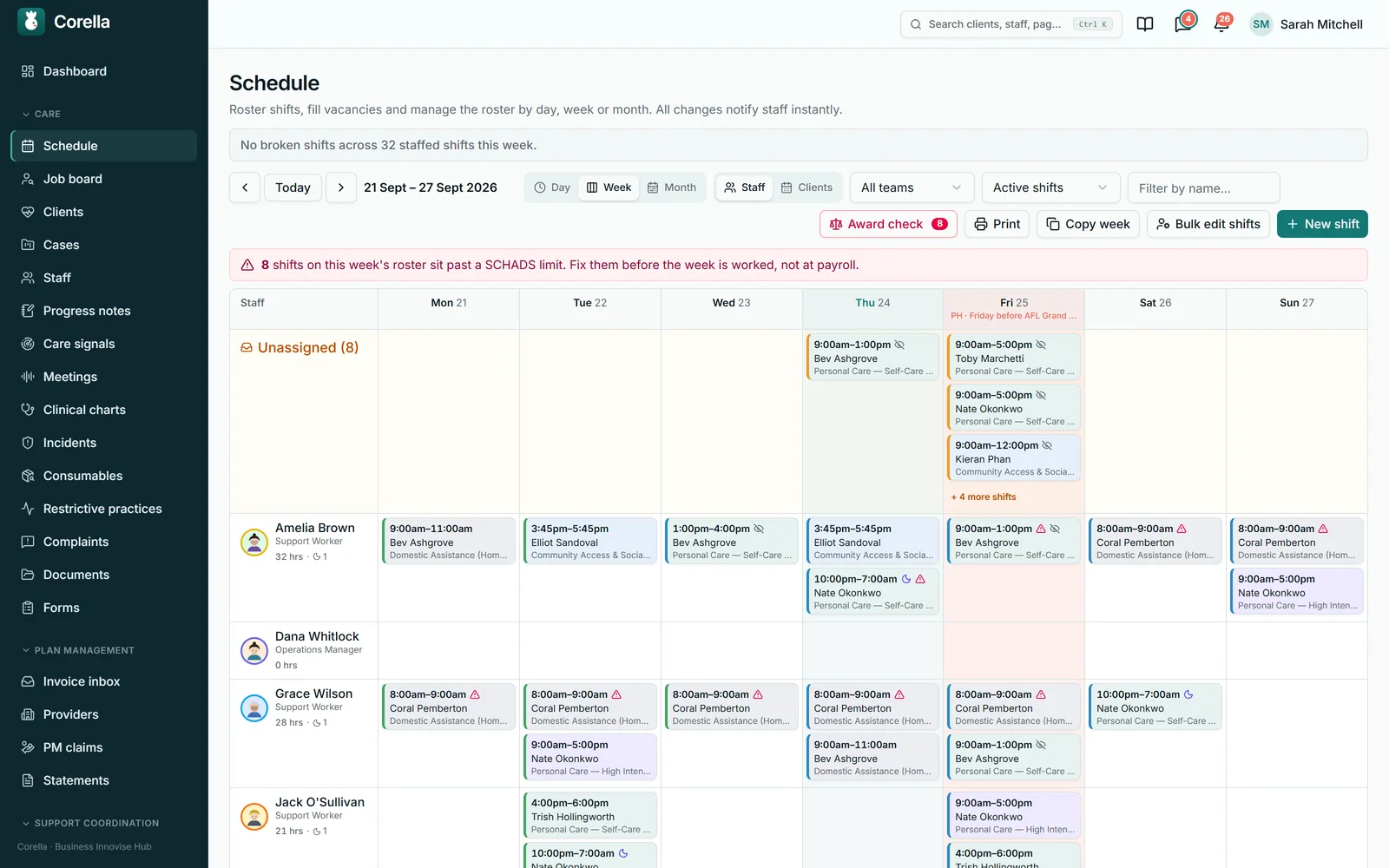
Create shifts on the board by worker or by participant, and let a weekly or fortnightly pattern lay out the months ahead. Conflicts and the nine award checks speak up as you book — before the shift is even saved.
- 2Fill the gaps
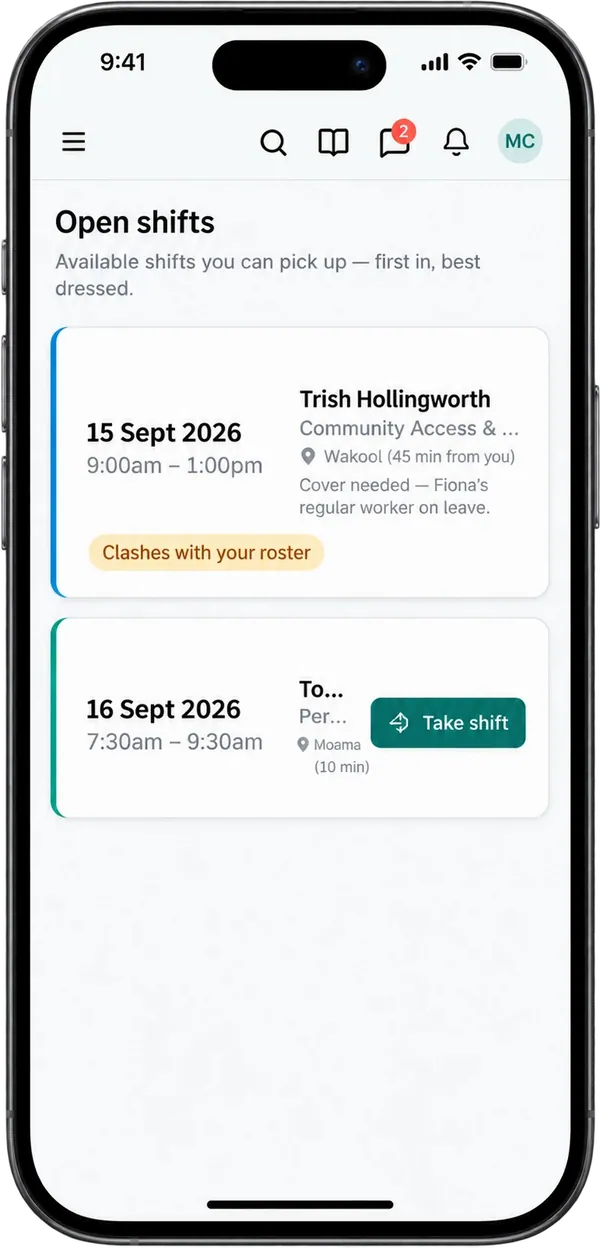
A shift nobody is on sits on the Unassigned row at the top of the board. Post it and it appears on workers' phones, where the first person to take it gets it — or rank the best-matched people and roster one with a click.
- 3Clock on at the door
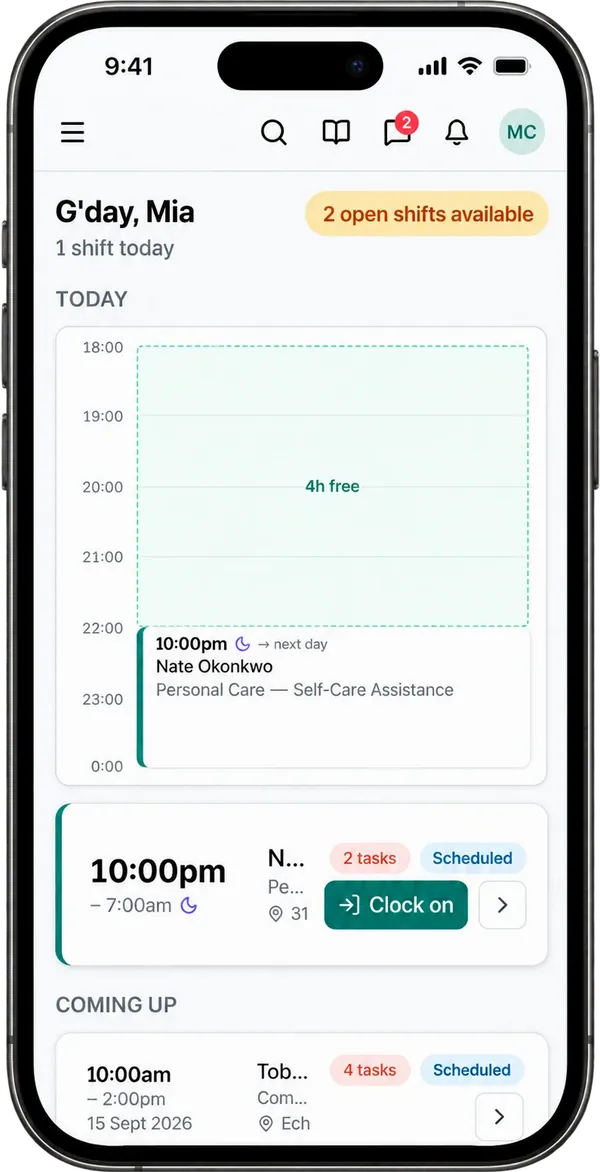
The worker clocks on from their phone and the position is recorded. If anything is recorded under need-to-know for the person they're visiting, they confirm it first. Clock-off waits for any must-do task.
- 4Approve what was worked
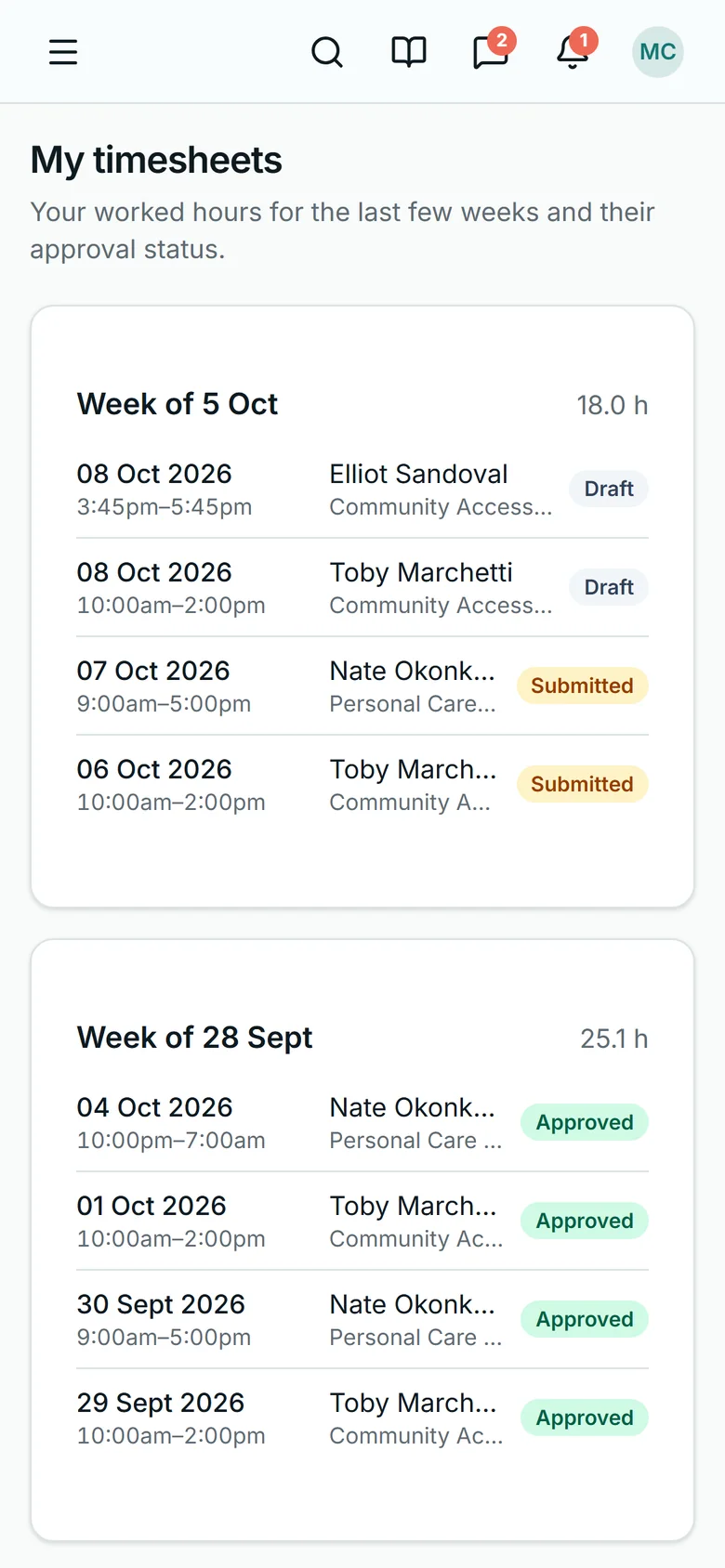
The timesheet queue puts rostered against clocked, with the variance and any travel the worker recorded. The office approves the scheduled or the actual times — one row at a time, or a ticked batch.
- 5Pay it
Approved hours become labelled pay lines — time bands, sleepovers, travel, kilometres — with the hours sent to Xero Payroll as draft timesheets where Xero is connected, and every line in a pay-run CSV for your payroll software. The worker sees each entry and its status on their phone.


Watch it
See it in 91 seconds.
What people ask first
The short answers, up front.
Can I see the week by worker and by participant?
Yes. The same week flips between a row per worker and a row per participant, zooms out to a month, or in to a single day laid out on a clock.
Does it handle sleepovers, group shifts and repeats?
A sleepover is its own kind of shift, one shift can hold several participants and several workers, and weekly or fortnightly patterns create real, editable shifts about six months ahead.
Can I drag a shift to someone else?
Yes — drag it onto another worker in the week's staff view to reassign it. The date and time stay as booked, and opening the shift changes either.
Will it warn me before I roster a problem?
As you book. Four things are refused outright: a worker the participant has blocked, a worker outside the team of a participant only their team works with, an office shift overlapping the worker's client time, and someone who has left. Everything else warns and leaves the call with you: a double-booking, leave, unavailability, a missing or expired check, the daily and weekly hours caps, rest after a sleepover, travel time between visits, required training, a participant's weekly or monthly limit where their agreement sets one, and the award checks.
How do open shifts get filled?
Workers take them from their phone, first in, and the shift is theirs at once. The office's job board ranks the best-matched people for every shift still short of staff.
Do I know where someone clocked on?
Yes. The phone's position is recorded at clock-on and clock-off, where the phone shares it, and compared with the visit's address — or the person's home, for a home visit — wherever that address has been placed exactly on the map — or, for a home found only to its street, once the office confirms the street's point; each person's page says whether their home has a fence. Outside the distance you set (1 km unless you change it), the timesheet shows how far away it was and waits for the office to approve it.
What does a worker see at the door?
If anything is recorded under need-to-know for that person — allergies first, then medical, dietary, mobility and more — it appears when they press Clock on, and they confirm it before the clock-on completes.
Who approves timesheets?
The office — from the timesheet queue, one row or a ticked batch, or from the shift itself, whose Timesheets panel offers the same Approve on scheduled or actual times, and Undo. Automatic approval within a tolerance is there when you switch it on.
How is travel paid?
Recorded on the shift, reviewed before approval, paid as its own line. The worker enters the kilometres and the minutes on the shift, and the office checks them on the timesheet queue.
Can I change a run of shifts at once?
Yes — one of six things across a worker's or a participant's shifts in a date range, with a review table naming every shift it leaves as it is, and why.
What reaches payroll?
Approved hours, split into labelled pay lines at the worker's pay-group rates. Where Xero is connected the hours go to Xero Payroll as draft timesheets, and every pay run exports a CSV for your payroll software.
Whose screen
The same job, from each seat.

In the office
The coordinator builds the week on the board — by worker or by participant, a day, a week or a month — and each shift is checked as it's booked. Gaps sit on the Unassigned row at the top, and the job board ranks the best-matched people for each one. A run of shifts changes in one pass, with the review table naming what it leaves as it is. Later in the week the timesheet queue puts rostered against clocked, the office approves the scheduled or the actual times, and the approved hours become a pay run — draft timesheets in Xero Payroll where Xero is connected, and a pay-run CSV. Building the roster is a coordinator's job; approving timesheets is open to finance as well.On the phone
The worker opens Corella in their phone's browser and adds it to the home screen as a web app. Their phone opens on today laid out as a timeline — the free time between visits worked out, and a 'now' line — then the next seven days, published shifts only, and any open shifts they can take, first in. At the door they press Clock on: if anything is recorded under need-to-know for that person, they confirm they have read it first. On the shift they tick tasks, record medication and the charts you keep for the person, write the note and fill in the travel card, and clock-off waits for any must-do task. Where you've switched it on, Ask for a shift sends the office a request, and the office books it or declines it. Afterwards, My timesheets lists the shifts they've started in the last four weeks, each with its approval status. On each shift, Your shift, step by step lists what the visit asks of them in order — clock on, tasks, medicines, goals, forms, the note, travel, clock off — each marked done or next.For families
A participant or family member with a portal login sees the next 28 days of visits: the time, the service, the worker's name — or 'to be confirmed' — and the address. For a change or a cancellation, they call the office.A worked example
One Thursday visit, turned into pay lines.
Made-up demo figures, to show the arithmetic. The rates come from each worker's own pay group, so this example shows the hours and the lines the pay engine produces, and each pay group's rates turn them into dollars.
- Rostered
- Thu 3:00pm–9:00pm · 6 h
- Weekday hours, 3:00–8:00pm
- 5.00 h at the weekday rate
- Evening hours, 8:00–9:00pm
- 1.00 h at the evening rate
- Travel time to the visit (25 min, typed by the worker)
- 0.42 h at the weekday rate
- Kilometres driven to the visit
- 18 km at the pay group's km rate
- Kilometres driven with the participant
- 12 km at the same km rate
- Pay lines in the pay run
- 5
Travel time pays at the rate of the band the shift starts in, and the two kinds of kilometre stay on separate lines. The 12 km with the participant can also reach an NDIS invoice as activity-based transport, where your price book carries a per-kilometre transport item, and the 18 km to the visit bills too once you switch on provider-travel billing. Check the pay lines against your own award obligations before each pay run.
Try it
See it work.
Week of 6 October · staff view
Swipe across for the whole week →
Between visits
Travel is part of the job. So it gets paid.
Workers record the kilometres and minutes they drove on the shift itself — to the visit, with the person, and, where you pay it, the drive home. The office reviews them before approval, and approved travel pays as its own line.
The hour lost to travel time was one of the first things providers showed us when we sat with their rostering teams. It isn’t a report you run afterwards — it’s on the shift, where the worker already is.


Mia’s travel
· Tuesday
Ruby L. · 11:305.8 km · 11 min
Sam K. · 14:006.6 km · 15 min
Recorded today12.4 km · 26 min
Recorded on the shift · paid once approved
Workers add their kilometres and travel minutes on the shift, any time until the timesheet is approved.
In detail
The detail, on the real screens.
One board — by worker or participant, a day, a week or a month
The week reads as a grid: a row per worker, or flipped to a row per participant, so 'is this worker over-rostered?' and 'who is visiting this person this week?' are answered from the same screen. Zoom in to a day, where every visit sits on a clock and the gaps between short visits are readable, or out to a month — one cell per date with its visits, hours, unassigned and cancelled counts. Shifts nobody is on sit on an Unassigned row at the top, so a gap can't hide. When someone leaves, their shifts show there as needing cover and booking them onto a shift is refused; a leaver still on a shift you open is shown so you can take them off. Boards with more than 25 rows page, keeping the Unassigned row on every page, and the totals and award banners always cover the whole period. Each tile takes its service's colour — an administrator can switch the colours off — and a 'Shift types this week' bar shows each type's share. Once you have appointment types, filter the board to one — or to No type — on the day, week or month. Roster → Table lays the same week out as one row per person on each shift — planned and clocked times, service and type, timesheet status, travel, expenses and whether a note was written — with the board's status, team and type filters, narrowed to one worker, participant or area, and one-click checks for shifts not clocked on, visits with no note written and travel claimed; each row opens its shift, and a CSV gives the same rows. Every tile on the week's board has a ⋯ to open it, copy it, post it to the job board or take it off, text it to the people who could take it, or cancel it. Print always prints a week: the staff print carries the award flags, and the participant print keeps pay warnings out of a participant's hands.

Group shifts, sleepovers and weekly patterns
One shift can carry several participants — the billing splits equally between them — and several workers, up to ten. A sleepover is its own kind of shift: the worker records any time they were woken, and the award checks look after its length, its frequency and the rest that follows it. Repeats are real shifts, not a rule applied later: a weekly or fortnightly pattern creates every occurrence about six months ahead as an ordinary, editable shift, and three weeks before a series' last shift on the roster, its tile and form say it's nearly finished, and the office gets an in-app reminder that opens that shift, where Extend until is. Tick Monday and Wednesday and you get two series, one per weekday — the drawer says so — and each is then edited, extended or ended on its own, with a badge showing how many occurrences it holds. Change one occurrence, or apply the change to all the later ones. A single shift can be copied into a new one, and a good week copied onto another — each copy is published just as a new shift would be. A shift's set-up can be saved under a name and picked again from the roster's Shift templates or the New shift form, and a repeating shift can take turns — two to six people, one on each shift, in order week by week. A shift's instructions for staff can carry bold, italic, underline, colour, lists and links, with a preview of exactly how staff will see them on their phone. Put one shift on several chosen days at once with Also on these days, and every day is checked before any is made; Extend says how many shifts it will add, and from when to when, before it adds them.

Drag a shift onto another worker to reassign it
On the week's staff view, drag a shift from one worker's row onto another's to reassign it. The shift keeps its date and time — drop it on a different day and only the worker moves, and the message tells you the date it stayed on — and opening the shift changes a time or a date. A tile on the Unassigned row can be dragged onto somebody, which fills the vacancy and closes its job-board offer. The drag runs the same conflict and award checks as editing the shift — a refusal refuses, and a softer warning asks you to confirm the move — tells the worker if the roster is published, and is recorded against your name: a shortcut with every one of those checks in place.

Conflicts that explain themselves — and cancellations done properly
Each shift is checked as it's booked, and each warning says what's wrong in words: another shift at the same time, requested or approved leave, a standing weekly unavailability, a mandatory check missing or expired, the daily or weekly hours cap, too little rest after a sleepover, and anything the award checks find. Four things are refused outright — a worker the participant has blocked, a worker outside the team of a participant only their team works with, an office shift overlapping the worker's client time, and someone who has left; the others warn, and overriding is a deliberate tick — each warning set aside is written to the shift's history with who saved it, whether it was saved from the drawer, a drag onto another worker, the job board's 'Roster anyway' or a copied week. Cancelling is a flow that keeps the record: cancelled by the provider, by the participant, or by the participant at short notice, and only the last is billable, under one of the NDIS cancellation reason codes. You choose separately whether the worker is still paid and whether they're told, and a cancelled shift can be rebooked.

The roster assistant — a proposal for every short shift, with its reasons
Beside Copy week, the roster assistant proposes someone for every shift this week still short of people — the people with the smallest teams first, then the earliest. A count heads the list: places to fill, how many it proposed, how many have nobody free. Each proposal shows a match number and its reasons for and against — free and inside the hours they said they can work, checks and training current, the skills the service needs, whether they've worked with this person before, a different area, a gap it would leave in their day — with the next best people beside it.

Dictate shifts — say the week, then check each draft
Where AI assistance is on, say or type the week's shifts — who they're for, the day, the times and who works them — and each comes back as a draft that shows how it read you: the words it came from, the service it inferred from them, and what it copied from an earlier draft when you said "the same on Saturday". Names are matched inside Corella against your own lists, and a name that fits two people, or a worker and a client alike, is left for you to pick.

Change a run of shifts — and see what it refuses to touch
Somebody goes on leave, a service is renamed, a house changes address. Pick a worker or a participant and a date range — both ends required, at most a year, because an open-ended sweep would quietly move next winter's roster — and change one thing across the run: who is on it, which participant, the service, the times, where it happens, or an allowance. Before anything is written you get a count and a review table naming every shift it leaves alone and why, and any row can be unticked. It refuses shifts where money has already moved: invoiced (only the address can still change), in a payroll batch, already worked or clocked on. On the worker axis it also refuses a shift carrying a pay-group override or a hand-attached allowance, because handing those to someone else pays them on an agreement nobody chose for them. And on the times axis the confirmation reads '25 hours will change → 42 hours after the change' — hours are pay, so you confirm the number you're actually agreeing to.

Open shifts, taken first in
Post a shift nobody is on from the job board, and the people who could work it — your care workers and anyone who has done a client visit in the last 90 days — are told in the app. On their phone, Open shifts lists what's available, each card marked 'You're on it', 'Not available to you', 'Clashes with your roster', or carrying a Take shift button. Taking one assigns the worker straight away, first in, and tells the coordinators: the first person to take it has it. The office works from the other end — the job board lists every shift still short of staff, soonest first, with the best-matched people ranked for it and one click to roster the one you pick, which re-runs the booking checks first. A coordinator can also text an open shift's day and hours to the workers who could take it, after seeing who it reaches and what it costs.

Clock-on and clock-off, checked against the address
The worker clocks on from the shift card on their phone, from three hours before the start by default. The phone's position is captured at each tap — clock-on and clock-off — stored with the attendance and, where the visit's address has been placed on the map, compared with it: outside the distance you set (1 km unless you change it), the clock is accepted and flagged on the timesheet, which then waits for the office to approve it — or refused with the worker told to ask the office, if you choose; each refused attempt is then listed on the timesheet with when and how far away, and the person's coordinator is told the first time. Clock-off is refused while any must-do task on the shift is undone, and — where your organisation requires it — until a progress note is written, with a minimum word count if you set one, and until each form marked Needed before clock-off is filled in for each person on the visit, so the record is complete when the shift ends rather than chased on Friday. A clock-off long after the rostered end is still accepted, because a worker who forgot should never be stranded; past the grace period (six hours by default) it is flagged on the timesheet and held for a person to approve. A sleepover is recorded with any time the worker was woken.

The brief at the door — if there is one
If anything is recorded under need-to-know for the person on the shift — allergies first, then intolerances, medical, dietary, mobility, communication, language and whether an interpreter is needed, cultural background, behaviour support, access and entry, good to know, and any of your organisation's own fields opened to workers — pressing Clock on shows it, and the clock-on only completes once the worker confirms they have read it. The confirmation is recorded against the timesheet with a digest of the exact wording they were shown, and it's findable on its own in the audit log, so 'was the allergy on the screen?' has an answer months later. If the record changes between the dialog opening and the tap, they are shown it again and told it was updated. Allergies always come first — a fixed display order, the same for every person.

Timesheets: rostered against clocked, approved by a person
Every clocked shift lands in one queue with the rostered hours, the clocked hours and the actual clock-on and clock-off times side by side, the variance between them, and any travel the worker recorded. The office approves on the scheduled times or the actual times — one row at a time, or a ticked batch — and editing a recorded time reopens approval, so nothing slips through half-checked. Once an entry is in a payroll batch it is locked. If you want it, clock-off can approve a timesheet by itself when the clocked times fall within a set tolerance of the roster (15 minutes by default); an approval made that way carries an 'auto' chip, so it's easy to find. Workers see their own entries and each one's status on My timesheets. Once anyone on a shift has clocked on, the shift itself shows a Timesheets panel — each person's scheduled against clocked hours, kilometres and travel — with the same Approve and Undo.

Travel: recorded on the shift, reviewed before approval, paid as its own line
On the shift screen, the travel card takes the kilometres driven to the visit, the kilometres driven with the participant, the minutes it took to get there, and whose car it was. It can be filled in whenever suits the worker, right up until the timesheet is approved. The office sees the figures on the timesheet queue and can correct them before approving. Approved travel pays as its own lines: travel time at the rate of the band the shift starts in, and the two kinds of kilometre on separate vehicle-allowance lines at the pay group's kilometre rate. Where an employer pays for the drive home after the last visit, that can be switched on and recorded too, as lines of its own. We built the travel card after a rostering admin showed us the hour a day she lost fixing kilometres and travel time on timesheets by hand. Put a company vehicle on a shift and the worker reads its odometer on their phone when they take it and when they finish — with a photo where you ask for one — and each reading goes into that vehicle's own log.

What reaches payroll
Only approved entries, and each one once. The pay engine splits each shift into the time bands it ran through — weekday, evening after 8pm, night before 6am, Saturday, Sunday and the public holidays of your state or territory — at the worker's pay-group rates, on the scheduled or the actual times, whichever the approval chose. Staff engaged as shiftworkers are paid the afternoon or night shift loading across the whole shift. A sleepover pays its flat allowance, plus any awake time the worker recorded at the night rate. Travel time and kilometres arrive as their own lines, a broken-shift allowance is paid from the number of unpaid breaks recorded on the timesheet, and on-call periods from your on-call register are paid in the same run. Where Xero is connected, the hours go to Xero Payroll as draft timesheets; every pay run also exports a CSV for your payroll software, one row per pay line with the employee, pay item, date, units, rate and amount. Once an entry is in a pay run it's locked, so the hours under a payslip stay fixed.

Straight answers
Safety built in: what warns you, and what it stops.
Warns you
- Another shift at the same time — a warning rather than a refusal, because two bookings in the same house can be deliberate.
- Requested or approved leave, and a standing weekly unavailability.
- A mandatory check that is missing or has expired.
- A booking that takes someone past their weekly hours cap, or inside their rest break after a sleepover.
- Every finding of the nine award checks, red or amber — on the shift, in the week's banner, and in the drawer as you book.
- A clock-off long after the shift ended (six hours by default): accepted, flagged on the timesheet, and held for a person to approve.
- A bulk change touching more than 20 shifts, which needs an acknowledgement before it runs.
- A casual booked onto the same weekday week after week — eight in a row unless you change it — once you switch that check on, so a regular pattern is a decision rather than an accident.
- A worker who keeps covering a participant outside that participant's team — three shifts by default, counting future and cancelled ones — as a note in the shift drawer you can dismiss.
Stops you
- A worker the participant has blocked — refused at booking, and set apart from the ranking.
- A worker outside the team of a participant only their team works with — refused at booking, and left out of the shift's staff list.
- Booking someone who has left — their shifts wait on the Unassigned row as needing cover.
- An office shift overlapping the worker's client time, either way.
- A drag once the shift is cancelled, clocked on to, timesheeted or invoiced (void the invoice first).
- A bulk change on any shift where money has already moved — invoiced, in a payroll batch, already worked or clocked on.
- Clock-on earlier than the window allows (three hours before the start, by default), or after the shift has ended.
- Clock-off while a must-do task is undone, or — where your organisation requires one — before the progress note is written or a form you've marked Needed before clock-off is filled in.
- If anything is recorded under need-to-know, the clock-on until the worker confirms it; Not now leaves them off the clock.
- Editing an entry once it's in a payroll batch, and changing travel from the phone once the timesheet is approved.
- Cancelling a shift that's already invoiced — void the invoice first.
Who stays responsible
The coordinator decides and Corella warns; a person approves every timesheet, apart from those approved automatically under rules you switched on. The pay engine turns approved hours into labelled pay lines for your payroll software, and your organisation stays responsible for paying correctly.
The rulebook
Questions, answered properly.
In the help centre

Who comes first when you pick a worker for a shift?
Can Corella suggest who should work each shift?
Can I just tell it the week's shifts?
What does dragging a shift do?
How does a worker get an open shift?
Does Corella check that a worker clocked on at the right address?
How is a half-written progress note kept safe?
Can a worker see what happened to a shift?
Can a worker see who else is visiting their participants?
Can workers put their shifts in Google or Outlook?
What can stop a worker clocking off?
When does a timesheet approve itself?
Can travel be entered before the shift ends?
What does the pay engine pay?
What exactly goes to payroll?
What happens when a shift is cancelled?
Is a worker told when their shift changes?
Can we build the week before staff see it?
Can we roster office work, or time that isn't client work?
Is on-call time paid?
Who pays for a buddy shift?
Does the roster allow travel time between visits?
Guides for this
Read the rule behind it.

See NDIS & aged care rostering software on a live instance.
Try the NDIS demo with a time-boxed pass, or book a walkthrough and we'll show you this part of Corella in your own words.