Compliance & documents
NDIS compliance software: The evidence, filed as the work happens.
Most providers don't fail audits for lack of care — they fail them for lack of filing. Corella keeps the evidence where an auditor will ask for it: documents that carry their own expiry dates, policies with an acknowledgement count, PDFs rendered from the record, forms that hold an unproven shift out of the invoice run, registers for risk, WHS, quality and complaints, and an audit log nobody can edit. It holds the evidence; whether it meets the standard stays the auditor's call.


The rule you work under
Registered NDIS providers are audited against the NDIS Practice Standards.
The NDIS Quality and Safeguards Commission sets the Practice Standards, and an audit against them is a request for evidence about a date: this participant's current plan, this activity's risk assessment and when it was last reviewed, a record that staff acknowledged this policy, whether this worker's check was current on the day. Corella keeps that evidence attached to the person, the worker or the program it belongs to, as the work happens. Whether it meets the standard is the auditor's call.
NDIS Practice Standards — NDIS Quality and Safeguards CommissionHow it flows
From a shift form to an invoice you can back
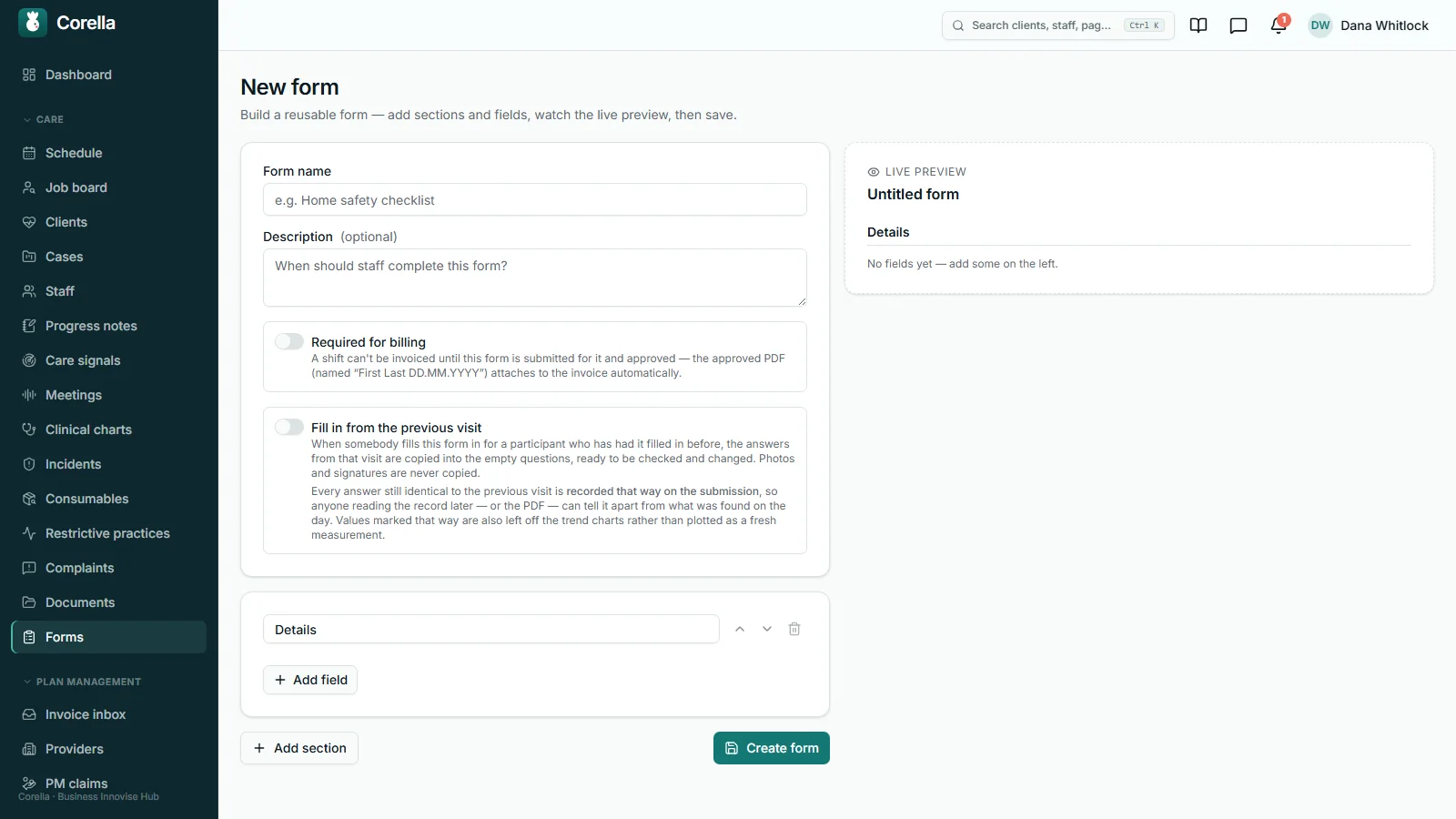
- 1Build the form once
Add sections and fields — photos and a drawn signature included — and switch on Required for billing. Choose which clients it covers — NDIS, aged care, private or other — or leave it blank to cover every client.
- 2Fill it on the shift
The worker fills it from the shift on their phone, and it lands in the office's queue as Awaiting approval. Editing the template later leaves every submission already made as it was.
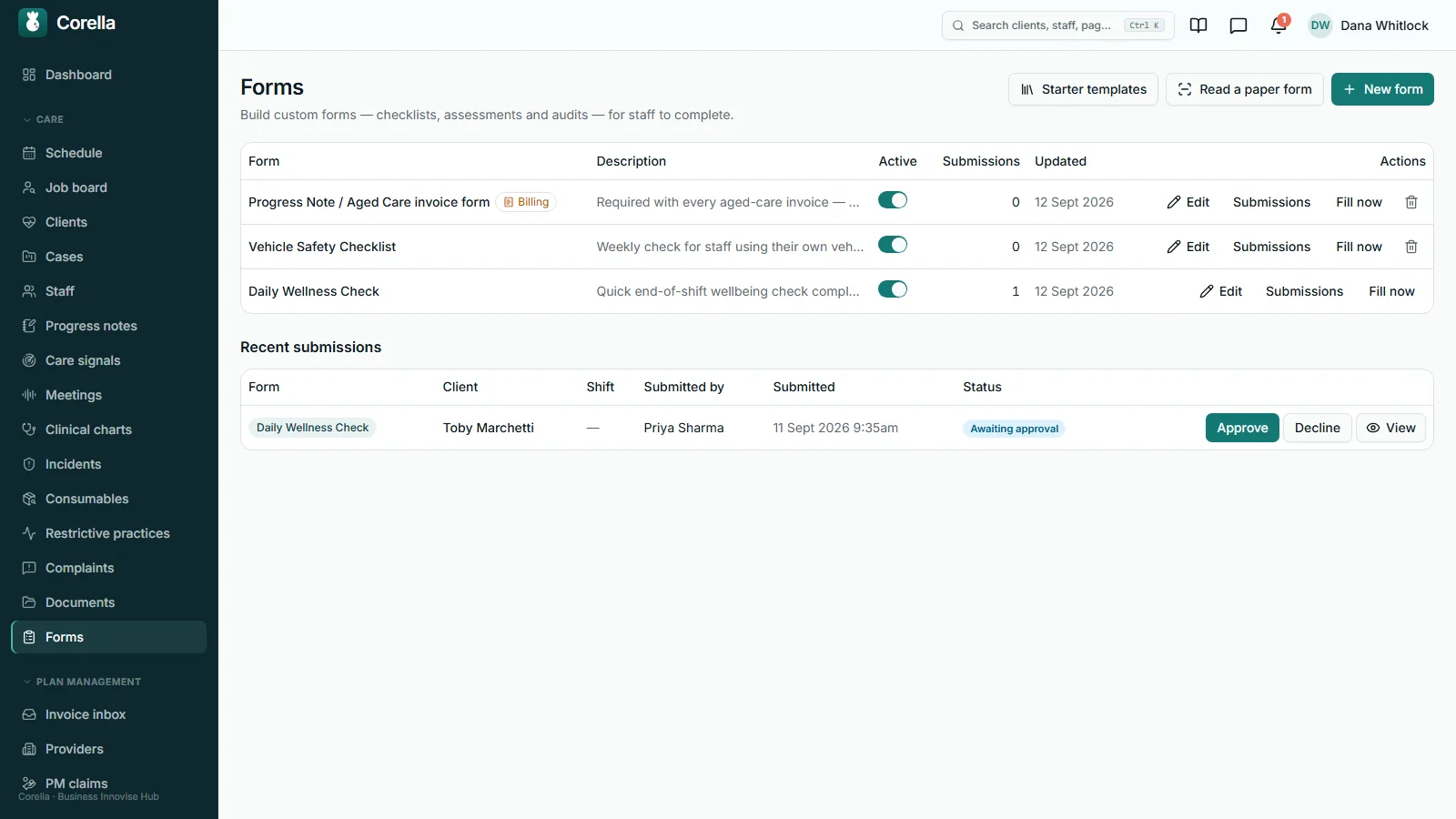
- 3Approve it from a queue
Someone at office level — finance, a coordinator or an administrator — approves it, or declines it with a reason so it can be fixed and sent again. Only an approved submission counts for billing.
- 4Filed and attached
Approval renders a PDF with the photos and signature in it, named First Last DD.MM.YYYY for the date of service, files it on the person's record — hidden from support workers — and attaches it to the invoice.
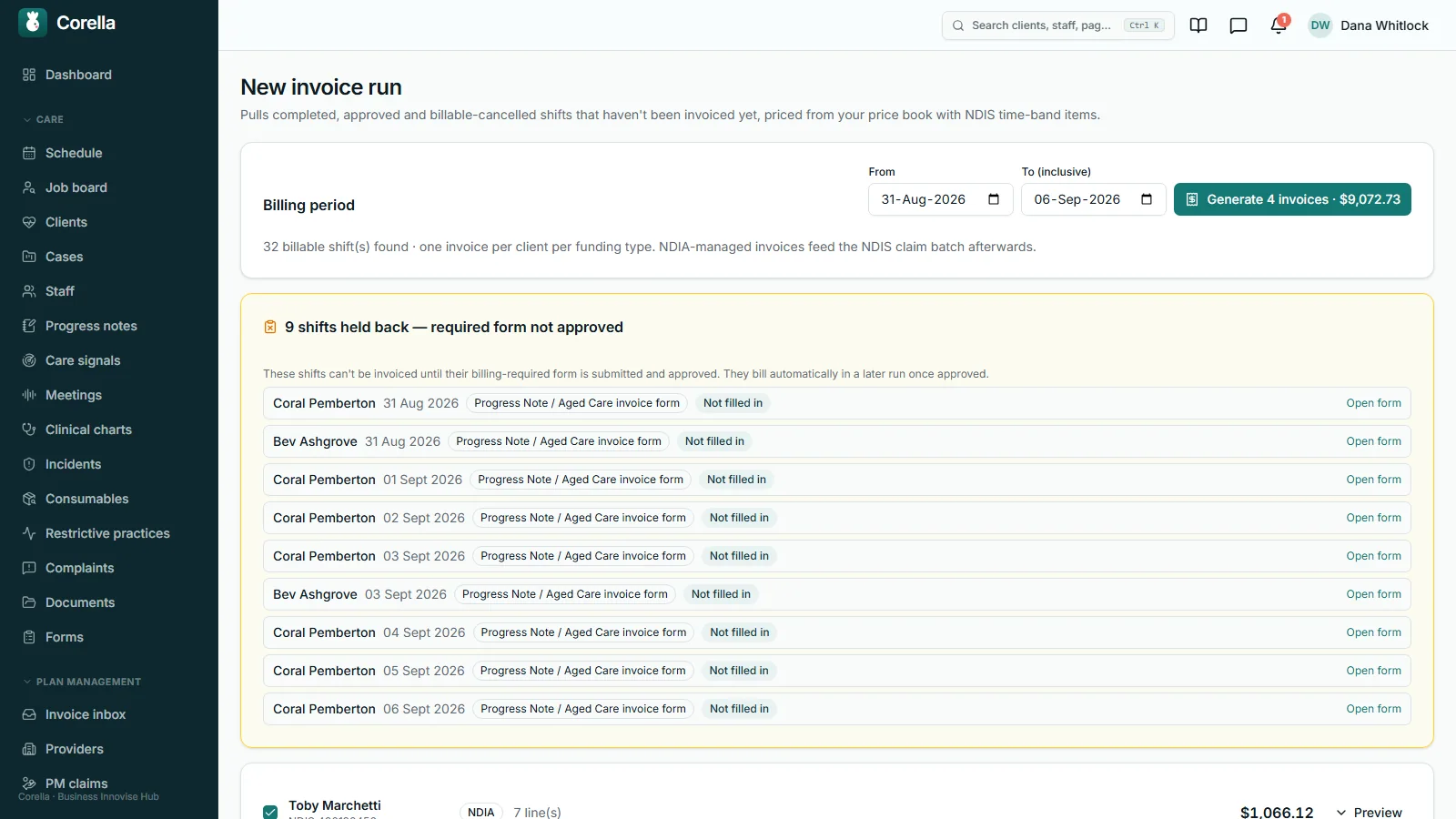
- 5Held until it exists
The invoice run holds back any shift still missing an approved form, and names it: the person, the date, the form. A later run bills it once the form is approved.


What people ask first
The short answers, up front.
What goes in the library?
Organisation, participant, staff and program files in one place — each with a category from your own list, an optional expiry date, and a document code and version.
Who hears about an expiry?
The staff member, for their own documents, and your administrators and coordinators for every kind — as an alert in the app, raised at 7 am once a file enters its reminder window.
Can we show staff acknowledged a policy?
Each acknowledgement is written to the audit log with the person and the time. On screen, the policy shows the count: so many of so many acknowledged.
Which PDFs does it generate?
Support plans, risk assessments, service agreements, intake summaries and outcome or progress reports, plus the PDF of every approved form — rendered from the record with your logo and details.
What keeps an unproven shift off an invoice?
A form marked Required for billing. Until a submission for that shift is approved, the invoice run holds the shift back and says which form is missing.
Can workers fill forms on a phone?
Yes — from the shift, with photos and a drawn signature. The approved PDF files itself on the person's record, office-only.
Can it read our paper forms?
Upload a blank form and it lists the questions; a person reviews each one and presses Create. The document is read by our AI provider in the United States, which is why it asks for a blank one.
What kinds of risk assessment?
Five — general, environmental with a job safety analysis, transport, personal emergency preparation and provider impact — about a participant or a program.
What other registers are there?
WHS, quality and internal audits, complaints, and vehicles and assets — each with its own statuses, and review dates where they apply.
Who changed what, and when?
The audit log, newest first. Administrators can read it; nobody can edit it — administrators included.
Whose screen
The same job, from each seat.

In the office
The quality lead's week runs on counts rather than searches: the number on the Expiring tab, so-many-of-so-many beside each policy, the forms awaiting approval, and — on the invoice run — every shift held back for a missing form, by name. Risk reviews, WHS reviews and vehicle dates raise alerts in the app as they fall due, and the audit log answers who did what, and when, without asking anyone.On the phone
A support worker sees the files ticked visible for the people on their shift — the support plan among them — their own documents with expiry lights, and the policies waiting for their acknowledgement. They fill forms from the shift, with photos and a drawn signature, and when one of their own checks is coming due they send the renewed document from their phone; the office confirms it once, and the roster's warning clears. The risk assessment and approved form PDFs on a person's record, and anything else marked office-only, stay in the office.For families
Forms, risk assessments, documents and registers stay inside your organisation. When a family, a GP or a funder needs a document, the office emails it from the person's record, and the send is logged: who, when and to whom, a failed send included.A worked example
One invoice run, with the proof chain switched on
A form marked Required for billing turns proof of support into a gate on the money. This is the NDIS demo's invoice run for one week — made-up data, the same run as in step five above.
- Billable shifts found in the chosen dates
- 32
- Held back — the required form not filled in
- 9, each named
- What the run lists for each held shift
- Person · date · form
- Invoices raised for the rest
- 4, one per person per funding type
- The approved PDF on each billed shift
- First Last DD.MM.YYYY
- What the nine held shifts lose
- Nothing — they wait for a later run
Demo figures from the NDIS demo, shown to explain the mechanism. A held shift stays uninvoiced, so a later run that covers its date bills it once the form is approved. On a group shift the whole shift waits, because billing one person would strand the other; a billable cancellation needs no form, because no support was delivered.
Try it
See it work.
1 · On the shift
Daily wellness check
Nate O. · Mon 6 Oct · community access
- Mood today
- Settled, chatty
- Fluids
- —
- Signature
- Drawn on the phone
2 · The office queue
Forms to approve
Nothing waiting yet.
Finance, a coordinator or an administrator approves. Only an approved submission counts for billing.
3 · The invoice run
Week of 6 October
Three shifts in the period, one of them Nate’s.
Demo data. A held shift stays uninvoiced, so a later run that covers its date bills it once the form is approved; on a group shift the whole shift waits. Editing the form later never rewrites a submission already made.
In detail
The detail, on the real screens.
Documents that carry their own dates
Organisation, participant, staff and program files live in one library, filed under your own category list — change the list and the picker changes; nothing already filed moves. Each file can carry an expiry date and its own reminder window, 30 days unless you set another. Every morning at 7 am, anything inside its window raises an alert in the app: to the staff member for their own certificate, and to administrators and coordinators for every kind — once a week at most for the same file — and the Expiring tab keeps a running count. A worker sends a renewed certificate from their phone; the office confirms it once, and the roster's warning clears. A participant's file is office-only until someone ticks it visible to workers, and then only the workers on that person's shifts see it. When a GP, a funder or a family needs a copy, the office emails it from the record once your organisation's email is switched on, and the send is logged — who, when and to whom, a failed send included.

Read-and-acknowledge, counted
An administrator publishes a policy as requiring acknowledgement, with a document code and version if you use them. It then waits on every staff member's own documents screen until they tick it, and each acknowledgement is written to the audit log with the person's name and the time. On the policy itself you see the count — 4/12 acknowledged, say — so “who has acknowledged the new procedure?” is a glance, and the names behind the count are in the audit log. A policy is acknowledged against its attached file, so there is always something to have read. When a procedure changes, publish the new version as its own document: its count starts again, and the old one can be archived without losing its history.

The PDFs an auditor expects, rendered from the record
Support plans, risk assessments, service agreements, intake summaries and outcome or progress reports render as PDFs from the structured record when you ask for one, carrying your logo and organisation details, and file themselves on the person's record under their own category — a program's risk assessment files on the program. Because each is the current record rendered, the document you hand a reviewer is the record as it stands that day, and nobody rebuilds it in Word at 4:45 pm. Who sees each kind is decided for you: the support plan is visible to the workers on that person's shifts, because it is what they work from; the risk assessments, service agreements, intake summaries, reports and approved forms on a person's record stay office-only.

Forms your workflow needs, filled where the work happens
Build a form in sections from a dozen field types — text, paragraph, number, date, dropdown, tick boxes, single choice, rating, photo, drawn signature, a value with a unit, and a figure calculated from other answers — and watch a live preview as you go. Nine clinical note templates install from a starter library as ordinary forms you can change. Workers fill forms from the shift on their phone, or the office fills one from a person's record. For a long form filled every visit, Fill in from the previous visit copies the last visit's answers in to be checked, and marks every answer still unchanged as unchanged — on screen, in the saved record and on the PDF — so nobody mistakes a carried value for one found on the day. Photos and signatures are captured fresh each visit. Each form's responses open as a report — one row per response, its questions as columns, for a period you choose — and Download CSV gives the same table. A form required for billing can cover only some services or appointment types, and where you tick Needed before clock-off, the worker fills it in before they leave.

Turn a paper form into a digital one — a person presses Create
Upload a blank form — a PDF, or a photo of the paper one on the desk — and it comes back as the list of questions that form asks. A person then reviews every question and presses Create, and the result goes through exactly the same checks as a form built by hand. The model writes a draft, and only a person turns a draft into a live template. It is given no tools at all — it reads one document and returns one list. And it was tested on refusals: a letter that is not a form yields zero questions; a box whose kind can't be told comes back as “the form didn't say”, with Create disabled until a person chooses; a choice cut off at the page edge stays cut off rather than being guessed into a plausible word; a question the form doesn't mark mandatory is recorded as not stated, never optional; and a document carrying instructions aimed at the AI is refused.

Risk assessments — for a person, and for a program
Five kinds, each shaped like the form it replaces: a general hazard register; an environmental risk assessment with a job safety analysis and a walk-through checklist of the place — walkways, floors, equipment, fixtures, first aid; a transport questionnaire; a personal emergency preparation plan, completed with the participant, with room to record a refusal and who witnessed it; and a provider-impact assessment with a dependency grid for mobility, hygiene, nutrition and the rest. The subject is a participant or a program, so the bus outing's hazards sit on the outing, not on one participant's file. Each hazard gets a likelihood and a consequence from 1 to 5, and the matrix multiplies them — 3 × 4 is 12, which is High. Each assessment carries a review date, an approval and a branded PDF that stays office-only. Where a client belongs to a team with a team leader, a hazard added or changed on their risk assessment sends the leader an urgent notice — in the app, and by email where your email is on — to check the job safety analysis still covers it. Where the phone drops out while someone fills in a risk assessment — in a client's home, say — every answer is kept on that device as it's typed, and it sends when the signal returns.

The WHS register, and the vehicles it depends on
Hazards, near misses, staff and workplace incidents, and inspections go in one register, each with a severity, controls, a corrective action and a status that runs open, in progress, controlled, closed. A review date raises an alert in the app when it comes due. The register draws its own boundary: it is about staff and premises, while a participant's risk lives in their risk assessment — and a staff injury usually belongs here and in the incident register, because the two answer to different obligations. Beside it, the vehicles and assets register keeps each vehicle's and each piece of equipment's registration and service dates, a log of check-outs, services and inspections, and who has what — and raises an alert in the app as a registration or service falls due. Archiving a vehicle or a piece of equipment records how it left — sold, traded in, written off, lost or stolen, or no longer needed — and the day.

Quality audits and complaints, kept honestly
Quality & audits holds two things. Internal audits — planned, in progress, completed — run against a checklist of requirements, each marked met or not with its evidence and the action. And a register of the practice standards you hold yourself to, each marked met, partial, gap or not assessed, with its evidence; the readiness figure is the share you have marked met. Complaints get a register of their own: log feedback and complaints — including one resolved on the spot — with how it arrived, who made it or that it was anonymous, a severity you choose, an owner, and the outcome recorded at close. A complaint is resolved or closed only once its outcome is written down, because a complaint closed without an outcome looks, at audit, exactly like one that was ignored. Complaints, feedback and compliments also arrive from your website's feedback form, on a key of its own, and an allied-health provider can raise a complaint through their portal, where you've opened it.

An audit log nobody can edit
Every significant change in the workspace is recorded, newest first, with filters: who approved a form, who acknowledged a policy, who generated which PDF, who changed a role and what it could reach before and after. Administrators can read it; nobody can edit it, administrators included — the screen is read-only. Our own support login is in it too, and Settings shows that login's last sign-in, that it needs a two-step code as well as its password, and a link to everything it has done, so you can see every login that can reach your records, ours included. When an auditor asks who did what, and when, the answer is already written down.

Straight answers
Safety built in: what warns you, and what it stops.
Warns you
- A document inside its reminder window — 30 days by default — raises an alert in the app at 7 am: to the staff member for their own file, and to administrators and coordinators.
- The invoice run names every shift it is holding for a missing or unapproved form: the person, the date, the form.
- A risk assessment past its review date is marked Review due, and the office is alerted in the app.
- WHS reviews and vehicle registration or service dates raise an alert in the app as they fall due.
- Before the file picker opens, the paper-form reader says the document goes to the United States and asks for a blank form.
Stops you
- A shift covered by a Required-for-billing form stays out of the invoice run until an approved submission exists — the whole shift, on a group shift.
- A form drafted from a document stays a draft until a person presses Create, and a box whose kind couldn't be told keeps Create disabled.
- Acknowledging a policy with no file attached.
- Editing the audit log — for anyone, administrators included.
- A template edit rewriting a submission already made.
Who stays responsible
Corella holds and organises the evidence, raises the dates and keeps the log. Your people make the calls: which practice standard applies, whether an incident is reportable, whether a hazard is controlled, whether a form is approved. Whether your records meet a standard is the auditor's decision against the NDIS Commission's current rules. And the paper-form reader drafts questions only — a person reviews every one and presses Create.
The rulebook
Questions, answered properly.
- Care management — incidents, restrictive practices and notes
- Billing & payroll — invoice runs and the Xero push
- People & HR — staff checks, training and roles
- Security — isolation, residency and the audit trail
- Try the NDIS demo
In the help centre

What happens to a shift whose required form isn't approved?
Who approves a form, and what does approval produce?
What is a drawn-signature field for?
Does the paper-form reader send our paperwork overseas?
How do expiry reminders work?
How do we see who has acknowledged a policy?
Can support workers see participants' documents?
How are document versions kept?
How does a hazard get its rating?
How does Corella help with an audit?
What happens to a staff message that's withdrawn?
Who can read the audit log, and who can change it?
Where do incidents and restrictive practices live?
Guides for this
Read the rule behind it.

See NDIS compliance software on a live instance.
Try the NDIS demo with a time-boxed pass, or book a walkthrough and we'll show you this part of Corella in your own words.