Billing & payroll
NDIS billing & claiming software: From delivered shift to banked claim, nothing re-keyed.
Every re-key between systems is an error waiting for an audit. In Corella the shift you rostered becomes the invoice line, the row in the NDIA's claim file you upload and the hours in the payroll export — and when the NDIA's outcome file comes back, it is read against those same lines.


The rule you work under
Since 24 September 2026, the NDIS price limits are legal limits
The Minister's first NDIS pricing determination took effect on 24 September 2026. It makes the maximum prices in the NDIS Pricing Schedule 2026-27 legal limits wherever a participant's funding is managed by the NDIA or a registered plan manager; self-managed funding isn't covered. A provider must not charge more than the maximum, the NDIA can refuse a claim above it or pay only up to it, and an overpayment can become a debt. The prices didn't move on the day — and a maximum is a ceiling, not an entitlement.
NDIS (Pricing Arrangements) Determination 2026 (F2026L01268) — Federal Register of LegislationHow it flows
One chain, from the price to the payment.
- 1Price it
Each service carries a rate per time band, each with its own NDIS item number and the 2026-27 price limit it is checked against. Work that needs agreeing first starts as a numbered quote with an expiry date.
- 2Deliver and prove it
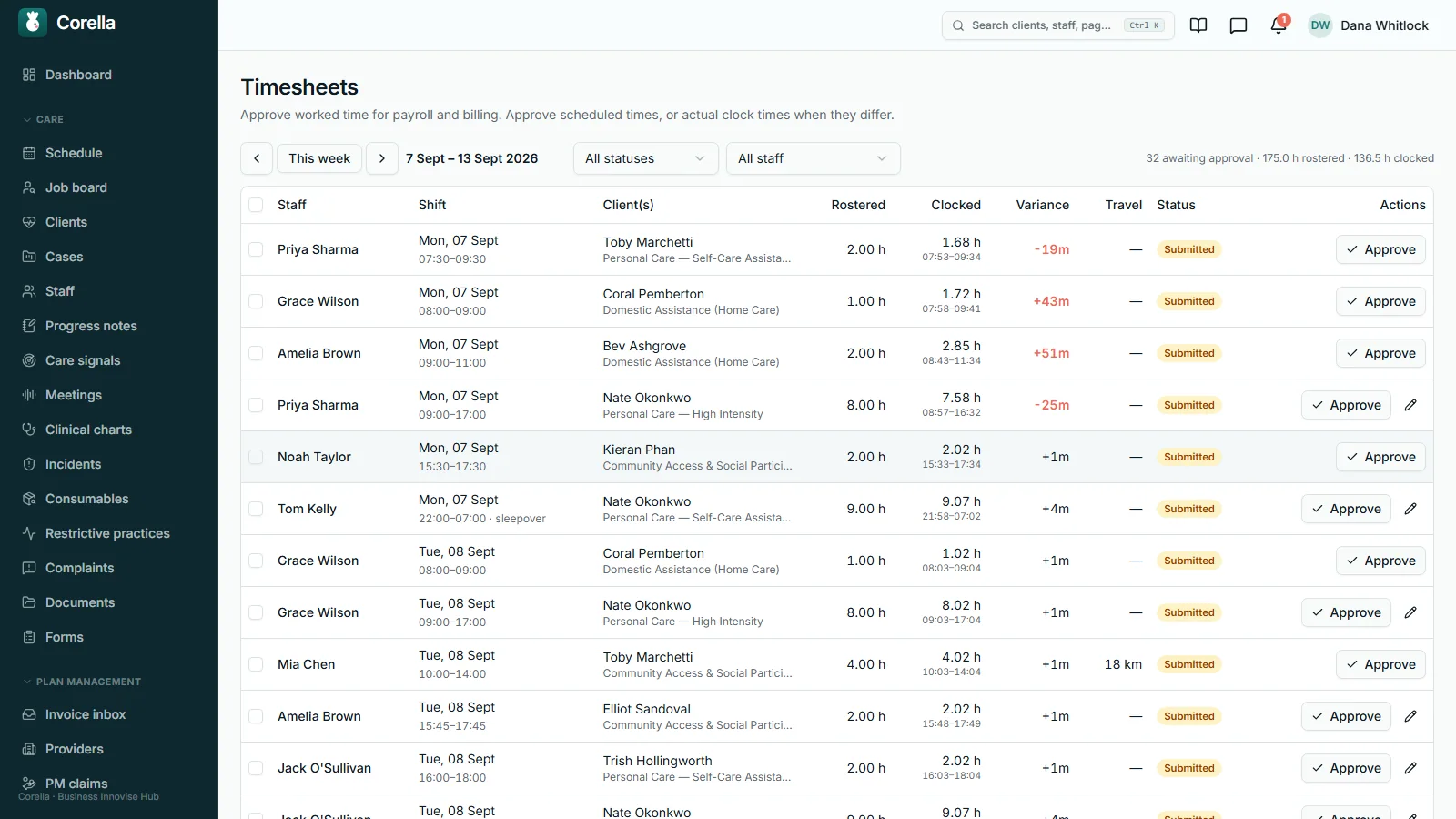
The worker clocks on and off from their phone and records travel on the shift; the office approves the timesheet for pay. Any form you have marked as required for billing is filled in on the shift and approved.
- 3Invoice it
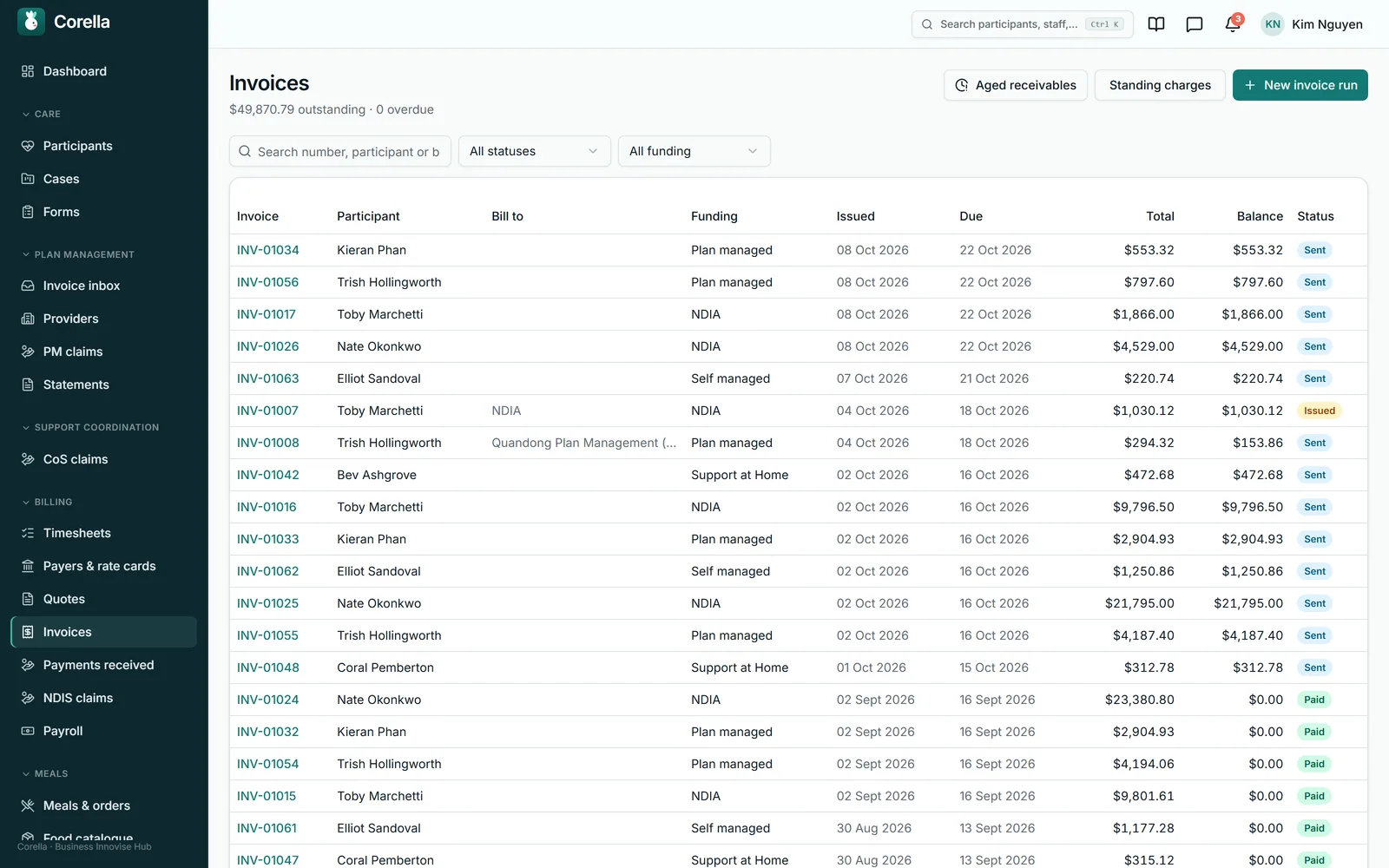
A run picks up the period's worked shifts, billable cancellations and standing charges that aren't on an invoice yet — one invoice per participant, funding type and episode of care — and holds back any shift still missing its approved form, or whose saved split no longer matches its times.
- 4Claim it
Lines for NDIA-managed participants batch into the NDIA's 16-column bulk payment request, checked first for NDIS numbers in the NDIA's format and support items in the Pricing Schedule for the day each was delivered. You download it and upload it in the provider portal.
- 5Get paid
Upload the NDIA's outcome file and every line is recorded as paid, part-paid or rejected. Part-payments, Xero's paid status and aged receivables by debtor show what is still owed, and by whom.


Watch it
See it in 65 seconds.
What people ask first
The short answers, up front.
Are the NDIS price limits built in?
Yes — the 2026-27 NDIS Pricing Schedule's limits, against each item and time band. The limit is a check, not your price: the price you set is what bills.
What happens when prices change on 1 July?
Nothing, until you look. The price-update screen audits your book against the new schedule, previews every change and writes only the actions you tick.
Can we see what was actually paid?
Yes. Upload the NDIA's outcome file and each claim line is recorded as paid, part-paid or rejected, with the NDIA's reason — then re-claim only the rejected lines.
What stops a shift being billed without proof?
A form you mark as required for billing. Until it is approved, the whole shift stays out of the invoice run, and the run names it.
Who does each invoice go to?
One invoice per participant, funding type and episode of care: to the episode's payer, the NDIA's claim file, the plan manager, or the participant.
Can we quote before we deliver?
Yes. Numbered quotes with a required expiry date convert into the funded service agreement, and keep the link back to the quote they came from. Either can be signed online through a private link you send.
Does it work with Xero?
Yes. Issued invoices go to your own Xero with their proof-of-support PDFs attached, and paid status comes back.
How does it hand over to payroll?
Approved timesheets become labelled pay lines: where Xero is connected the hours go to Xero Payroll as draft timesheets, and every pay run exports a CSV for your payroll software.
Is Support at Home billed here?
Yes. Aged-care work goes on its own invoices, and issuing a Support at Home invoice charges its visits to the participant's Support at Home budget, at the moment the invoice is issued.
Whose screen
The same job, from each seat.

In the office
Finance works from a handful of screens: the invoice run, with every shift held back for a missing form named at the top; the claim batch and its outcome import; recorded payments; and aged receivables by debtor. Coordinators see each participant's budget bars on the Funding tab of their record. Each screen reads the rows the roster, the timesheets and the forms already made, so nothing is typed twice.On the phone
Workers' screens are about the visit. On the phone they clock on and off, record their kilometres and travel time on the shift, and fill in any form the shift needs — which is what lets the office invoice it. Invoices, claims and margins stay with the office.For families
A participant or family member with a portal login sees the plan's budget by support category, and approves or declines invoices from the providers their plan manager pays — a decline carries its reason, and the office is told either way. Portal logins for participants and families are free.A worked example
Two hours of weekday support, from the price to the claim line.
A standard weekday daytime support, 7:30 to 9:30 on a Monday, for an agency-managed participant, with the price set at the NDIS limit. The dollar limits are the NDIA's published figures; the visit and the choice to charge at the limit are demo figures.
- NDIS limit, standard weekday daytime support (2026-27)
- $73.58 an hour
- Rostered 7:30–9:30 am Monday, one time band
- 2.00 hours
- Invoice line: 2.00 × $73.58
- $147.16
- Its row in the 16-column claim file
- qty 2.00 · $73.58 · its own claim reference
- If the outcome file says part-paid
- the amount paid, recorded beside $147.16
- The same support's 2025-26 limit
- $70.23 an hour
- A price book still on $70.23 bills this visit at
- $140.46 — $6.70 short
- What the price-update audit calls that line
- Under cap — usually last year's number
Limits from the NDIS Pricing Schedule 2026-27 (from 1 July 2026, unchanged by the 24 September 2026 determination) and the 2025-26 limit it replaced, both the NDIA's published figures. A limit is a ceiling, not a price you must charge — the price in your book is what bills. Ticking “Lift prices that sat on last year's limit” would move $70.23 to $73.58, and only after you confirm you've discussed the change with the participants affected.
Try it
See it work.
1 · Export
The bulk payment file
48 lines in the NDIA’s 16-column template, from your issued invoice lines. You upload it in the provider portal.
2 · Bring back
What the NDIA actually paid
Upload the outcome file and every line is recorded as paid, part-paid or rejected — with the NDIA’s own reason.
45 paid · 2 part-paid · 1 rejected
3 · Re-claim
Just the line that bounced
Release the rejected line under a fresh reference once it’s fixed — instead of rebuilding the whole batch.
In detail
The detail, on the real screens.
A price rise you have to look at before it happens
Each service carries up to seven rates — weekday, evening, night, Saturday, Sunday, public holiday and sleepover — and each band owns its NDIS item number, your price and the national limit it is checked against. A participant can have their own price for a band, and every such override is audited. When the NDIA publishes a new schedule, updating the book is where a year of billing can quietly go wrong, so it is a deliberate, reviewed step. The screen opens with an audit: prices over the limit and under it, a stored limit that is still last year's, items missing from the catalogue or on its Legacy sheet, participant prices above the limit, and lines already billed above it — marked invoiced or actually claimed, because a claimed line needs a correction, not a price edit. Then three separate choices, all unticked: update the stored limits, which changes no price; bring prices above the limit down to it; or lift prices that sat exactly on last year's limit. Nothing is written until you have seen the list and pressed Apply, and applying is recorded in the audit log.

Pricing rules that follow how you charge
A price book says what an hour costs; these rules say how a visit becomes a charge. A service can bill a minimum — an hour, say — and round the time above it up in steps, such as 15 minutes, and the minimum covers the whole visit even when it crosses a price band. A service can also say how long its fee covers, and the invoice run names any visit that ran past it, so the office decides how to claim the extra. A visit that crosses a band boundary is charged pro rata by default, or — your organisation's choice — wholly at the band it finishes in, or at the dearest band it touched. If a service has no rate for a band, the booking shows “Weekday rate used” and the invoice run names every visit that fell back, instead of billing it quietly. New services start with your organisation's GST treatment. And when a shift is cancelled, the dialog states the notice rule that applies — the payer's own, or your policy in hours, clear days or clear business days, public holidays counted — before a person decides whether it bills.

Quote the work, then turn it into the agreement
Work usually starts with a price, not an invoice. Quotes are numbered, carry the NDIS item number and a description that shows the recurrence a funder actually reads, and count the quantity for the whole engagement rather than per visit. Every quote needs an expiry date — a quote with no expiry is a price promise nobody agreed to hold — and it moves from draft to sent, then accepted, declined or expired. When one is accepted it converts into the funded service agreement — its money split into category budgets from the quote's own lines, each line placed where its category is clear and the rest named for you rather than guessed — and keeps the link back to the quote it came from, so there is a trail from the offer to the commitment. A quote to an organisation, such as a facility or a practice with no patient named, becomes that payer's dated rate card instead, one price per quoted service. Line totals are stored rather than recalculated, so a quote you sent in June still shows June's numbers after the price book moves on 1 July. A quote or a service agreement can be signed online: you send a private link from your own mailbox, and the person — or whoever signs for them, saying how they are related — reads it, types their name, ticks the acknowledgement and draws a signature. Corella records who signed, when and the exact wording they saw, files the signed PDF and tells the office.

Proof of support: held back until it's approved
Mark a form as required for billing — for every participant, or only for some program types, services or appointment types — and the chain runs from there. The worker fills the form in on the shift. Someone at finance level or above approves it, or declines it with a reason so it can be fixed and resubmitted. On approval Corella files a PDF named for the participant and the date, attaches it to their record and to the invoice, and it goes to Xero with the invoice when you push it. A shift whose form isn't approved yet is held out of the invoice run — the whole shift, for every participant on it, so one missing form never strands the others — and the run names each one. The next run picks it up once the form is approved. We built it after watching a finance officer chase shift forms every Friday afternoon.

Invoice runs and printable tax invoices
A run takes a billing period and picks up every shift in it that has been worked or approved, plus cancellations marked billable, that isn't on an invoice yet — with billable consumables and kilometres driven with the participant. It groups them into one invoice per participant, funding type and episode of care, and locks what it billed so nothing is invoiced twice. Each invoice goes to the right party: an episode's payer where there is one, otherwise the NDIA for agency-managed funding, the plan manager on the active agreement, a billing contact, or the participant. Terms come from the payer, or your organisation's default of 14 days. Standing charges — a fixed weekly, fortnightly or monthly amount, such as equipment hire — are billed by each run as they fall due. The printable tax invoice carries your ABN, registration number and bank details. Record a payment of any amount and the balance stays owing until it's cleared; void an invoice to release its shifts, consumables and standing charges for the next run.

The claim file — and what the NDIA actually paid
Issued invoice lines for NDIA-managed participants batch into the NDIA's bulk payment request in its exact 16-column template: each line's claim type — a standard support, a short-notice cancellation with its NDIS reason code, or travel — its GST code, and a file name kept under the portal's 20 characters. Every line gets a claim reference that is made once and stored, so exporting the same batch twice gives the same references. Before the file exists, the batch checks every NDIS number against the NDIA's format and every support item against the Pricing Schedule for the day it was delivered, and names any the NDIA would reject. You download the file and upload it in the provider portal. When the NDIA's outcome file comes back, you upload that too, and each claim line is recorded as paid, part-paid or rejected — with the amount actually paid and the NDIA's own reason — matched on the claim reference. Then release just the rejected lines: a line can be corrected — its item, quantity or unit price, checked against the Pricing Schedule for the day of service — and claimed again in the next batch under a fresh reference, with the rest of the batch left as it is. It tells you what you were paid, not just what you claimed.

Aged by who actually owes you, not by who you support
Current, 1–30, 31–60, 61–90 and 90-plus days, with a CSV — aged by debtor rather than by participant, which sounds like a detail until you try to chase it. The person you support is often not the party that owes you money, so the report separates four kinds of debtor: a payer, a plan manager, a named bill-to, and the participant themselves. Age runs from the due date; an invoice that never had one is aged from its issue date plus your terms and labelled as inferred, on screen and in the export, rather than quietly assumed. Outstanding is the total minus what has actually been paid — so an invoice somebody marked paid after a short payment still appears, which is exactly the one you would otherwise never find.

Xero connected, payroll exported
Each organisation connects its own Xero with its own consent. An issued invoice goes across with its proof-of-support PDFs attached — as soon as the run raises it if you switch that on, otherwise when someone presses Push. Before creating anything, Corella asks Xero whether it already holds that invoice number: one match with the same total is linked rather than duplicated, anything else is refused and named, and void invoices stay in Corella. Paid status comes back through a check every fifteen minutes, with Xero's payment notification used for speed, and a payment you recorded in Corella stands as you recorded it. Payroll turns approved timesheets into clearly labelled pay lines — time bands with your state's public holidays, shiftworker loadings, sleepovers, broken-shift allowances, on-call pay, travel time and kilometres — sends the hours to Xero Payroll as draft timesheets where Xero is connected, and exports every pay run as a CSV for your payroll software. Payroll → Check hours lays out one person's visits in a period with the hours and pay the payroll engine works out — to check a contractor's invoice, or the hours somebody says they worked — with a CSV of the visits. Set the day one of your pay periods began and whether pay runs cover a week or a fortnight, and Payroll offers your last whole pay period, Timesheets shows a pay week at a time and the award check counts weekly overtime over it. Your state's public holidays are built in, and a shift across a daylight-saving change is paid and billed for the time that actually passed — an hour less on the October night the clocks go forward, an hour more in April.

Plan management and support coordination, in their own lanes
Plan managers get an inbox for the provider invoices they receive on participants' behalf. Each one is checked — the participant is plan- or self-managed with an NDIS number, the provider's invoice number isn't a duplicate, the budget category has money left — then sent to the participant's portal to approve or decline, or put on hold. Approved invoices batch into the same 16-column claim file, and the payment run produces an ABA file your bank imports, one payment per provider. A month-end run charges the plan-management fees and produces a statement for each participant, ready to print; an invoice entered after the run carries into the next statement, and a sent statement stays exactly as it was sent. Support coordinators record billable case notes, with the minutes, against a coordination item; those notes batch into the same claim file, and implementation, mid-term and end-of-plan reports are tracked against a due date and highlighted when overdue.

Five billing switches, ready when you are
Some of the most-asked-for billing behaviours are in the product, ready for the day you switch them on — each one changes what a funder is charged or what staff see, so each is your decision. A draft roster — build the week privately, then publish it to staff — is one organisation-wide switch. Billing provider travel, the drive to the visit in kilometres and in minutes, is a second: once an administrator turns it on, the travel a worker records is charged to the funder as well as paid to the worker. A second invoice line for a shadow worker on a training shift — a 2:1 charged as two people — is a third. Two more are chosen shift by shift: splitting one visit into priced segments, so travel at the edges and care in the middle each bill their own line, and capturing a participant's or a worker's signature on the shift itself. A split can be drawn as you create the shift, and a repeating shift then gets the same split on every shift it makes, at the same times of day. In a split shift, Travel at the start or Travel at the end adds a travel part billed at the support's own line item, and that person's recorded travel minutes aren't charged again. A person's record can carry their usual service, which their new visits start on, and can keep provider travel off their invoices, whatever your practice-wide switch says. A shift with none of these set bills exactly as it always has.

Straight answers
Safety built in: what warns you, and what it stops.
Warns you
- The price-update audit names every price over the limit or under it, any stored limit that isn't this year's, items missing from the catalogue or on its Legacy sheet, participant prices above the limit, and lines already billed above it — invoiced or actually claimed.
- The invoice run lists every shift held back for a required form, with the form's status: not filled in, submitted or declined.
- Booking a shift on a service with no price warns you first — it would invoice at $0.
- Funding warnings in the shift drawer flag a tight budget as you book, and the booking stays your call.
- An outcome-file row that matches no claim line, or more than one, is shown for a person to settle, and any unfamiliar status text is reported for a person to check.
- Aged receivables marks an invoice whose due date had to be inferred, on screen and in the CSV.
Stops you
- A shift without its required form approved stays out of the invoice run — the whole shift, for every participant on it.
- Invoicing a shift twice — to re-bill it, void the invoice, which is refused while a payment is recorded or a line sits in a claim batch.
- Building a claim batch while an NDIS number is missing or not in the NDIA's format, or a support item isn't in the Pricing Schedule for the day it was delivered — the batch names each one before the file exists — or before your organisation's registration number is set.
- Before creating an invoice in Xero, Corella asks Xero for its number: one match with the same total is linked, anything else is refused and named, and void invoices stay in Corella.
- Every quote carries an expiry date — three business days after the quote date unless you set one.
- Lifting prices on the price-update screen needs you to confirm you've discussed the change with the participants affected, or that their service agreements are being updated.
Who stays responsible
The price you charge, the item you claim under and the files you upload stay yours. Corella holds your price book against the published limits, checks each claim batch against the Pricing Schedule, builds the claim file for you to upload and reads the NDIA's answer back. Pay lines are checked against your own award obligations before each pay run.
The rulebook
Questions, answered properly.
- Free NDIS bulk payment checker — the file, before and after upload
- Compliance & documents — the forms behind the hold-back
- Rostering & attendance — timesheets and travel
- Staffing & funding forecast — plan underspend and shift margins
- Clinical & episodes of care — payers, rate cards, consumables billed once
- Support coordination & plan management
- Try the NDIS demo
In the help centre

Can we record one payment that covers several invoices?
Can Corella email an invoice to whoever pays it?
Does payroll go to Xero Payroll?
Can we build our own reports?
What happens to a rejected claim line?
What happens when the NDIA publishes new prices?
What if a shift's paperwork isn't done?
Which times does the invoice use?
Can one participant have more than one funding type?
What does Corella's pay engine send to payroll?
What does the Xero connector actually do?
How do plan managers pay providers?
Who can see invoices, claims and payroll?
How does Support at Home billing work?
What happens to our rate cards when prices go up?
Why are some billing features yours to switch on?
Guides for this
Read the rule behind it.
- NDIS claimingThe 2026-27 NDIS price guide: every official file, and what changed
- NDIS claimingNDIS claiming without the spreadsheet gymnastics
- NDIS claimingWhy NDIA bulk payment requests get rejected (and how to stop it)
- NDIS claimingAgency, plan-managed or self-managed: how the invoice actually differs
Sources
- NDIS pricing schedules 2026-27, effective 24 September 2026 — NDIA
- National Disability Insurance Scheme (Pricing Arrangements) Determination 2026 (F2026L01268) — Federal Register of Legislation
- Pricing arrangements archive: the 1 July 2026 schedule and the 2025-26 documents — NDIA
- NDIS support catalogue 2026-27 — NDIA
- Guide to getting paid — NDIA

See NDIS billing & claiming software on a live instance.
Try the NDIS demo with a time-boxed pass, or book a walkthrough and we'll show you this part of Corella in your own words.